
Blog.
The latest digital marketing news, free guides and insights straight from Growthworx HQ.
I Needed A Locksmith but I Never Visited Their Website
Yesterday I had a problem. A genuine, needs-fixing-today problem.
I needed a locksmith in Malvern. Urgently.
So what did I do? I did what everyone does. I opened Google, typed in "locksmith Malvern," and looked at the Map Pack results.
Three options appeared. Three locksmiths, all in my area, all showing up in that golden real estate at the top of Google search results.
One stood out immediately.
Why? Two things.
He had the most reviews. Not just good reviews—the most of them. That signals consistency and real customer experience.
His profile was complete. No missing information. No red flags. It looked professional and trustworthy.
So I did what any sensible customer would do. I quickly scanned through a handful of his reviews.
All recent. All five stars. Not a dodgy review in sight.
And here's the important bit—they mentioned specific details. Lock changes (exactly what I needed). Good pricing. Fast service. Quick response times. Professional work.
By the time I'd finished reading those reviews, I knew exactly what I was getting.
So I called.
He answered with expertise. Gave me clear information. No confusion. No hard sell. Just straightforward answers to straightforward questions.
I booked him for the next day.
He's coming tomorrow, the job will be done, and I'll pay him immediately.
All within 24 hours from the moment I started searching.
Here's Why This Matters For Your Business
I run a digital strategy consultancy. I help local businesses get found online. And even I—someone who absolutely knows better—completely bypassed the website.
Because the decision was already made before I ever would have clicked it.
The Google Business Profile made the sale. The reviews closed it. The responsiveness confirmed it.
The website never got a look in.
This is the reality most local business owners don't understand.
The Website Myth
There's this persistent belief in small business that the website is where the magic happens. That if you just get your website right, customers will find you and buy from you.
It's not completely wrong. But it's not the full picture either.
For a lot of local service businesses—plumbers, electricians, locksmiths, cleaners, builders—the website isn't the primary decision driver. It's the afterthought. The thing people might look at if they've already decided to call you.
But they have to find you first. And they have to trust you before they dial.
And in 2026, that happens on Google Maps.
The Map Pack Is Where You Win
The Google Map Pack—those three results that show up at the top of a local search—is where the real competition happens.
When someone searches for your service in your area, they see those three listings first. They see ratings. They see review count. They see how many people have rated you. They see your phone number, your address, your hours.
If you're not in those top three, you're fighting for attention further down the page.
But here's the thing: being in the top three isn't enough. Your profile has to be complete. And you have to have reviews—recent ones, genuine ones, that mention the specific services people are searching for.
That's what converts.
The Locksmith's Winning Formula - The locksmith I called didn't win the job because his website was beautiful. He won it because:
He showed up in the Map Pack - Top three. Right there when I searched. That's visibility.
He had more reviews than his competitors - Not just good reviews—more of them. That signals consistent quality and real customer experience. That builds trust instantly.
His profile was complete and accurate - No missing information. No confusion. No reason to distrust him. That removes friction.
His reviews were genuine - Recent. Consistent quality. Five stars across the board. No obvious fake reviews. That's authentic social proof.
His reviews mentioned what I was actually looking for - Lock changes. Good pricing. Fast service. Professional work. They answered my questions before I even called him. That's targeted social proof.
He responded with real expertise - When I called, he was informative, helpful, and clear. No runaround. That confirmed what the reviews suggested.
He converted fast - From search to booking within minutes. From booking to job completion within 24 hours. That speed is trust in action.
That's the entire sales process. Compressed into less than an hour.
What His Website Actually Did
Now, does he have a website? Probably. Maybe it's great, maybe it's terrible. I have no idea because I never went there.
But here's the thing—even if his website had been stunning, it wouldn't have mattered. The decision was already made through the Map Pack listing and reviews.
If he'd invested in a beautiful website but neglected his Google Business Profile and reviews, he'd have lost this job to someone with a worse website but better local SEO and social proof.
Because I wasn't looking for a website. I was looking for a locksmith who was easy to reach, came recommended by real customers, and could actually solve my problem.
The Lesson For Your Business
If you're a local service business owner, this should be your priority order:
Google Business Profile. Full, complete, accurate, with all the information a customer needs. This is where customers find you. Don't leave anything blank.
Recent, genuine reviews. Actively collect them. Respond to them. Make it easy for customers to leave feedback. Recent reviews (last few months) matter more than old ones. And reviews that mention specific services and details matter far more than generic praise.
Responsiveness. When someone calls, emails, or messages you through Google, be fast. The locksmith called me back quickly. That confirmed the reviews. That sealed the deal.
Quality service. The reviews were five stars because the work was good. That's not luck—that's consistency.
A functional website. Not fancy. Just working. Clear information about what you do and how to contact you. It's the safety net, not the main event.
Everything else. Social media, clever copywriting, fancy design—these are nice to have. But they're not what drives the phone ringing.
The Real Opportunity
Here's what excites me about this: most of your competitors are probably getting this wrong.
They're focused on their website. They're not actively managing reviews. They're not responding quickly to inquiries. They're not optimizing their Google Business Profile for visibility. They're not collecting reviews that mention specific services.
That means there's a massive opportunity for businesses that do get it right.
Show up in the Map Pack. Have a complete profile. Get more recent reviews than your competitors. Make sure those reviews mention the services people are searching for. Respond faster. Be helpful. Be professional. That's the formula.
The locksmith I called understood this. Whether by accident or design, he was the option that looked most trustworthy, most complete, and easiest to reach. His reviews answered my questions before I even called. And when I called, he delivered exactly what the reviews promised.
So I booked him. Paid him the next day. He converted a lead to a paying customer within 24 hours.
That's what happens when you get the fundamentals right.
Thanks for reading,
Ollie
Sign up to my free newsletter here for more useful tips, insights and guidance.
My mates Cousins Cat Built My Website - And Why It's Killing Your Local SEO!
We've all heard it. Or maybe you've been it. "Oh, my website? Yeah, my mate's cousin's cat is quite good with computers. She built it for me one weekend. Didn't cost much."
Sound familiar? Here's the thing—that website probably cost you far more than the few hundred quid you saved. I'm not being dramatic. I'm being honest.
The Problem With "Good Enough" Websites
When someone without proper experience builds your website, they're usually optimizing for the wrong things. They're making it look nice (or at least, they think they are). They're getting your contact details on there. Job done, right?
Wrong. Dead wrong.
A website isn't just a digital brochure. It's your shop window, your salesperson, and increasingly—your biggest competitor's biggest vulnerability. Because if your website doesn't work hard for you, your local competitors' websites will work hard against you.
Here's What Happens
Bad websites are like having a beautiful storefront with a broken door. People can see it looks nice from the street, but they can't actually get inside to buy anything.
Technically, this shows up in several ways:
Your site loads slowly. When your mate's cousin builds a site, they often don't care about file sizes, image optimization, or server performance. Google certainly cares though. So do your potential customers, who'll click away after three seconds if your site crawls along like a tired snail.
The code is a mess. Poor structure means search engines struggle to understand what your site is actually about. You could be ranking for nothing even though you should be ranking for everything. SEO doesn't happen by accident—it happens because someone understands how to build it in from the start.
There's no strategy. A proper website isn't just pages. It's a system that guides people toward a specific action—calling you, getting a quote, booking a consultation. Without that structure, visitors wander around lost. They leave. Your conversion rate becomes your biggest problem.
The SEO Disaster
This is where it gets really painful for local business owners.
Local SEO—getting found by people searching for your services in your area—depends on your website sending consistent, correct signals to Google. A badly built site sends mixed signals. Or no signals at all.
Missing meta descriptions. Broken internal linking. No local schema markup. Duplicate content issues. Keyword stuffing that makes your site read like a ransom note. These aren't just technical glitches—they're the difference between showing up on page one and disappearing into page ten.
And once you're on page ten? You might as well not exist.
The Credibility Problem
Here's something people don't talk about enough: a bad website makes you look small.
When someone lands on your site from a local search, they're making a split-second judgment. Does this business look professional? Can I trust them with my money? Will they actually deliver?
I covered this in yesterday artticle.
A poorly designed website—even if it's technically functional—tells visitors you don't care enough to invest in your business. They'll click to your competitor's site instead. The one that looks like someone actually put thought into it.
This isn't vanity. It's pure business logic.
What A Proper Website Actually Does
A strategic website:
Works on every device (mobile-first, because that's how people search now)
Loads fast enough that people don't bounce before it even appears
Has clear navigation so visitors find what they need in seconds
Uses proper SEO structure so Google understands your business
Converts visitors into leads because there's an actual strategy behind the layout
Builds trust through professional design and clear information
Tells your story in a way that matters to your specific local audience
Stays updated and secure (because an outdated website is a liability)
The Reality Check
You wouldn't ask your mate's cousin to do your accounts, right? You'd get an accountant. You wouldn't ask them to handle your legal stuff—you'd get a solicitor.
Your website deserves the same level of professionalism, if you’re not getting the enquiries you deserve then it might well be be problem.
I'm not saying every website needs to cost a fortune. But it needs to be built with strategy, purpose, and technical competence. It needs to work for you, not against you.
Because in local business, your website is often the first impression. Make it count.
Thanks for reading,
Ollie
Sign up to my free newsletter here for more useful tips, insights and guidance.
Your Website Gets Visitors. Why Aren't They Calling?
You're showing up on Google. People are landing on your website. But the phone isn't ringing and the enquiry form stays empty.
Here's the uncomfortable truth: most local business websites are digital brochures, not sales tools. They tell people what you do but make it surprisingly difficult to actually get in touch.
The 5-Second Test
When someone lands on your homepage, they decide within five seconds whether to stay or leave. In those five seconds, they need to know three things:
What do you do?
Do you serve my area?
How do I contact you?
If any of these require scrolling or hunting, you're losing enquiries.
Your Phone Number Belongs at the Top
This sounds obvious, but I audit local business websites every week where the phone number is buried in the footer or hidden on a contact page.
On mobile especially, for the vast majority of local service businesses your number should be:
Visible without scrolling
Clickable (tap-to-call)
Large enough to tap with a thumb
Next is The "What Now?" Problem
Every page on your website should answer one question: what do you want the visitor to do next?
Read your services page? There should be a clear next step
Finished reading a blog post? Direct them somewhere
On your homepage? Make the action obvious
Buttons that say "Get a Quote" or "Book a Free Call" outperform "Contact Us" every time. Be specific about what happens when they click.
Forms = Shorter is Better
Every additional field on your contact form reduces submissions. Name, phone, email, brief message. That's it. You can qualify leads on the phone – your job online is just to start the conversation.
Speed Matters More Than You Think
If your website takes more than three seconds to load on mobile, roughly half your visitors leave before seeing anything. Check yours at Google's PageSpeed Insights. If it's slow, that massive hero image or unoptimised photos are likely the culprits.
The Trust Gap
People searching locally are often comparing three or four businesses at once. They're looking for reasons to trust you:
Reviews prominently displayed
Real photos (not weird stock images that show an American call centre from 2010)
Clear pricing or at least pricing guidance
Proof you're established and legitimate
A website that looks professional but feels anonymous loses to one that feels human and trustworthy.
One Change This Week
If you’re getting traffic to your website but not many enquiries the look at your website on your phone. Time how long it takes to find your phone number and tap to call. If it's more than two seconds, fix that first. Everything else can wait.
Thanks for reading,
Ollie
Sign up to my free newsletter here for more useful tips, insights and guidance.
Squarespace vs WordPress: Making the Right Choice for Your Business Website
It's one of the most common questions we hear from clients: "Should we build our website on Squarespace or WordPress?" It's a fair question, particularly when well-meaning agencies insist that WordPress is the only "serious" option for business websites.
The truth is more nuanced. Whilst WordPress powers over 40% of the web and offers incredible flexibility, it's not always the right choice for every business. Let's cut through the noise and look at what actually matters for most business websites.
Understanding the Fundamental Difference
Before diving into comparisons, it's crucial to understand what you're actually choosing between.
Squarespace is an all-in-one platform. You get hosting, design templates, security, support, and updates all bundled together. It's like buying a new car—everything works out of the box, and the manufacturer handles the maintenance.
WordPress (specifically WordPress.org, the self-hosted version) is open-source software you install on your own hosting. You're responsible for choosing hosting, installing plugins, managing updates, and maintaining security. It's more like building a custom car—you have unlimited options, but you need to know what you're doing or hire someone who does.
The True Cost of Ownership
This is where many businesses get caught out. WordPress appears cheaper on the surface, but the total cost of ownership tells a different story.
Squarespace costs between £20-55 per month depending on your plan. This includes everything: hosting, SSL certificate, security, unlimited bandwidth, templates, and customer support. It's a predictable expense you can budget for.
WordPress itself is free, but you'll need hosting (£10-80+ per month), a premium theme (£40-100 one-off or annual), essential plugins for forms, SEO, security, and backups (£200-500+ annually), an SSL certificate (sometimes included with hosting), and regular developer support unless you're technically proficient. When you add it up, most WordPress sites cost £1,500-4,000+ annually once you factor in all the components and occasional developer hours.
More importantly, there's the hidden cost of time. How many hours will you or your team spend managing updates, troubleshooting plugin conflicts, or dealing with security concerns? For most businesses, this time is better spent serving customers.
Security and Peace of Mind
Security is non-negotiable for business websites, yet it's often underestimated.
Squarespace provides enterprise-grade security as standard. Automatic updates, DDoS protection, SSL certificates, and regular security patches all happen behind the scenes. You don't need to think about it, and neither do we. It simply works.
WordPress requires active security management. Because it's so widely used, it's the number one target for hackers. You need security plugins, regular updates to WordPress core, themes, and plugins, and constant vigilance. Miss one plugin update, and you could face a security breach. We've seen businesses lose days of work and thousands of pounds recovering from compromised WordPress sites.
This doesn't mean WordPress is inherently insecure—properly maintained WordPress sites are very secure. But that's the key phrase: "properly maintained." Can you guarantee that level of ongoing maintenance?
Ease of Use and Getting Things Done
When you need to update a product, add a blog post, or change your opening hours, how quickly can you do it?
Squarespace shines here. The interface is intuitive enough that most team members can make updates with minimal training. Add an image, change text, publish—it's straightforward. This independence is valuable.
WordPress has a steeper learning curve. The dashboard can be overwhelming with its multitude of options, plugin settings, and technical jargon. Whilst some businesses appreciate this level of control, many simply want to update their content without feeling like they're operating a spaceship control panel.
Design and Customisation
This is often WordPress's strongest argument, and it's valid—to a point.
WordPress offers virtually unlimited customisation. With thousands of themes and plugins, plus the ability to custom-code anything, you can build almost any type of website imaginable. If you need a complex membership site, marketplace, or custom web application, WordPress's flexibility is unmatched.
Squarespace has limitations on customisation, but here's the question: do you actually need unlimited customisation? For most business websites—whether you're generating leads, showcasing your work, or selling products—Squarespace's templates are more than sufficient. They're professionally designed, mobile-responsive, and regularly updated to stay current.
The paradox of choice is real. Having 60,000 WordPress plugins available often leads to analysis paralysis, bloated websites, and compatibility issues. Squarespace's curated approach means everything works together seamlessly.
SEO Capabilities
"WordPress is better for SEO" is perhaps the most persistent myth we encounter.
Modern Squarespace includes everything you need for effective SEO: clean code that Google can easily crawl, fast loading speeds, automatic mobile optimisation, SSL certificates, customisable meta titles and descriptions, automatic XML sitemaps, and integration with Google Search Console and Analytics.
WordPress certainly offers more SEO plugins and granular control, but here's the reality: most businesses never use 90% of those advanced features. What matters for ranking isn't having the most plugins—it's having good content, a fast site, mobile optimisation, and proper technical setup. Squarespace provides all of this without the complexity.
Support and Troubleshooting
When something goes wrong—and eventually, something always goes wrong—support matters.
Squarespace offers 24/7 customer support via email and live chat. If you encounter an issue, you contact one company that's responsible for the entire platform. Response times are typically quick, and they can actually fix your problem.
WordPress support is fragmented. You might contact your hosting provider, theme developer, or individual plugin creators—each pointing fingers at the others. Stack Overflow and community forums are helpful, but when your website is down and you're losing leads, you want someone who can fix it now, not a forum discussion.
Making Your Decision
So, which should you choose?
Choose Squarespace if you:
Want a professional website without technical headaches
Need predictable costs and timelines
Value your time over endless customisation options
Want to focus on your business, not website management
Need a standard business site for lead generation, portfolios, or straightforward e-commerce
Don't have in-house technical expertise
Choose WordPress if you:
Have specific custom functionality requirements
Already have technical expertise in-house
Need extensive third-party integrations not available on Squarespace
Are building a content-heavy site with thousands of pages
Genuinely need that level of flexibility and control
Have budget for ongoing development and maintenance
The Bottom Line
The question isn't which platform is objectively "better"—it's which platform is better for your specific situation. WordPress is an incredibly powerful tool, but power without purpose is just complexity.
For most businesses, Squarespace offers the sweet spot: professional results without the overhead. It's not about settling for less; it's about choosing the right tool for the job. Your website should be an asset that drives your business forward, not a technical burden that drains resources.
We recommend Squarespace to most of our clients not because it's easier for us (if anything, WordPress projects are more lucrative), but because it's genuinely the better choice for their needs. They get better results, fewer headaches, and more time to focus on what they do best.
Whatever you choose, make sure you're choosing based on your actual needs, not someone else's opinion about what a "serious" business website should be.
Thanks for reading,
Ollie
Sign up to my free newsletter here for more useful tips, insights and guidance.
Why 'Getting More Traffic' Is Terrible Business Advice
"We just need more traffic." I hear this at least once a week. A business owner calls, convinced that their problem is visibility. If only more people visited their website, their problems would be solved. More traffic equals more enquiries equals more sales. Simple mathematics, surely?
Except it isn't. And chasing traffic before you've sorted out everything else is one of the fastest ways to waste money I've seen in twenty-five years of business.
The obsession with traffic is the digital equivalent of opening more tills when your shop is selling products nobody wants. You're optimising the wrong part of the system. And in my experience running a strategic digital growth consultancy, it's almost always a distraction from the real work that needs doing.
The £8,000 Traffic Experiment
A construction business came to me last year after spending £8,000 on Google Ads over six months. They'd quadrupled their website traffic. Result? Two enquiries, neither of which converted.
The problem wasn't the advertising—the agency had done decent work driving clicks. The problem was what happened when people arrived. The website message was confused, the value proposition unclear, the pricing hidden, and the contact process awkward. They'd successfully driven hundreds of people to a shop that wasn't ready for customers.
When we dug deeper, we discovered more fundamental issues. Their service offering tried to be all things to all people. Their pricing was misaligned with the market they were trying to serve. Their sales process was chaotic. They hadn't clearly defined who their ideal customer was or why those customers should choose them over competitors.
More traffic didn't fix any of this. It simply broadcast their confusion to a larger audience.
The Traffic Obsession Trap
The reason "get more traffic" is such popular advice is because it's easy to say, easy to measure, and easy to sell. Digital marketing agencies love traffic goals because they're achievable and look impressive in reports. "We increased your traffic by 250%!" sounds brilliant, even if revenue hasn't shifted.
But traffic is a vanity metric. It makes you feel like you're making progress whilst potentially achieving nothing meaningful for your business. It's activity masquerading as progress.
Consider what traffic actually represents: people who clicked a link. That's it. They haven't bought anything. They haven't enquired. They haven't even necessarily read your content. They just... clicked. And you're paying for each of those clicks.
Traffic without conversion is like footfall in a retail store where nobody buys. It might indicate location visibility, but it tells you nothing about whether your proposition works. In fact, high traffic with low conversion often indicates that you're attracting the wrong people—and that's worse than attracting nobody at all.
What Traffic Can't Fix
From twenty-five years in senior management, including private equity exits, I've learned that sustainable business growth comes from fundamentals, not tactics. And traffic generation is pure tactic. Here's what more traffic absolutely cannot fix:
An Unclear Value Proposition
If you can't articulate why someone should buy from you rather than your competitors, driving more people to that confused message won't help. I worked with a professional services firm whose website traffic was healthy but conversion was dismal. Their homepage tried to appeal to five different customer types with three different service models. More traffic just amplified the confusion.
Poor Product-Market Fit
Your offering might not match what the market wants at the price you're charging. I've seen businesses spend thousands driving traffic to services that nobody wants to buy at the prices they've set. Each click is just another person confirming that your offering isn't compelling.
Operational Inadequacy
Your business might not be ready for more customers. Perhaps your fulfilment is chaotic, your customer service overwhelmed, or your sales process broken. A trades business once asked me to help them "scale" with more traffic, but they were already struggling to deliver on time for existing customers. More traffic would have destroyed their reputation amongst a larger audience.
Wrong Audience Targeting
You might be attracting people who will never buy from you. Budget shoppers when you're premium priced. Consumers when you're B2B. People in the wrong geography or industry. More of the wrong traffic is worse than no traffic—it consumes your time and gives false signals about what's working.
The Real Cost of Bad Traffic
Chasing traffic before you're ready isn't just ineffective—it's expensive in ways that don't show up in your marketing reports.
Time cost - Every unqualified enquiry consumes hours qualifying, quoting, and following up with someone who'll never buy.
Opportunity cost - Budget spent on traffic is budget not spent on improving your offering, training your team, or developing genuine competitive advantages.
Credibility cost - Poor reviews from customers you shouldn't have served damage your reputation with customers you should be serving.
Focus cost - Traffic obsession distracts from meaningful measures like customer lifetime value. You optimise for clicks instead of building relationships.
I've watched business owners become depressed because "nothing's working" when actually, their traffic is fine. They're just measuring the wrong things and ignoring the fundamentals that determine whether traffic converts to revenue.
What Should Come Before Traffic
If "get more traffic" is usually bad advice, what's good advice? These fundamentals need sorting first:
Crystal-Clear Positioning
Know exactly who you serve and what problem you solve for them. Not vague demographics, but specific customer types with specific needs you're uniquely equipped to address. When you have this clarity, your marketing writes itself.
Validated Value Proposition
Confirm that what you're offering is something your target market actually wants at a price they'll pay. This means talking to real customers and honestly assessing whether your offering stacks up. Traffic generation before validation is printing thousands of flyers before checking whether anyone wants what you're selling.
Functioning Conversion Path
From first contact to closed sale, your process needs to work. Fix a process that converts 5% to one that converts 15%, and you've tripled your business without buying a single additional click.
Operational Capacity
You need the capability to serve more customers well. Driving traffic before you have capacity is like revving the engine before engaging the clutch—noise without forward motion.
Measurement Infrastructure
Know what's actually working—which traffic sources deliver customers who stay, spend, and refer. Without this understanding, more traffic just generates more data you can't interpret.
When Traffic Generation Actually Makes Sense
I'm not suggesting traffic doesn't matter or that you should never invest in generating it. But it should come later in the strategic sequence, not first.
Traffic generation makes sense when:
Your fundamentals are sound. You know who you serve, what you're offering them, why they should choose you, and how to convert enquiries into customers efficiently. Now you're ready to scale something that works rather than amplify something broken.
You've validated product-market fit. You have evidence that your offering resonates with your target market at your price point. You're not hoping traffic will solve this problem—you already know the answer.
Your conversion infrastructure is optimised. Your website, sales process, and fulfillment systems have been tested and refined. You're converting a healthy percentage of prospects, and you understand what drives that conversion.
You have capacity to serve more customers well. Your operations can handle increased volume without quality degradation. You're not hoping to "figure it out as we grow"—you have systems ready to scale.
You can measure and attribute effectively. You know which traffic sources deliver profitable customers. You can tell the difference between visits that matter and visits that don't. You make decisions based on contribution to business goals, not just traffic volume.
When these conditions are met, traffic generation becomes a genuine growth strategy rather than an expensive distraction. You're pouring fuel on a fire that's already burning, not trying to start a fire by pouring fuel on wet wood.
The Strategic Alternative
Instead of starting with "how do we get more traffic?", I encourage clients to start with "how do we serve our ideal customers exceptionally well?"
This leads to different questions:
Who exactly are those ideal customers?
What problems do they need solving?
Why would they choose us over alternatives?
How do we deliver extraordinary value?
What would make them refer us enthusiastically?
Answer these questions well, and traffic becomes easier. Not because you're buying more of it, but because you're earning it through reputation, referrals, and content that genuinely helps your target audience.
I've seen businesses transform their growth by narrowing their focus, deepening their expertise, and serving a specific market segment exceptionally well. Their traffic often increases, but as a result of excellence, not as a substitute for it.
The businesses that grow sustainably are those that solve real problems for specific people better than alternatives. The traffic follows the value, not the other way around.
The Consultancy Approach
This is why strategic digital growth consultancy starts with business fundamentals, not traffic tactics. When a client comes to me wanting more traffic, we begin by auditing whether they're actually ready for it.
Often, we discover that the real opportunity lies in improving conversion rates, refining positioning, streamlining operations, or developing more compelling offerings. Sometimes we find they're already getting enough traffic—they're just not converting it effectively.
The traffic conversation comes later, once we've built something worth driving people towards. And when we do focus on traffic, it's strategic—targeting specific segments with specific messages through specific channels, all connected to clear business objectives beyond "get more visitors."
This approach isn't as immediately exciting as "let's run some ads and triple your traffic." But it's how sustainable business growth actually happens. And after twenty-five years in business, I've learned that doing the right things in the right order beats doing the exciting things in the wrong order.
The Bottom Line
More traffic feels like progress. It isn't, unless everything else is working first.
It's like buying a larger megaphone when your message is confused, your offer is unclear, and you're not sure who you're trying to reach. The megaphone doesn't fix those problems. It just broadcasts them more loudly.
Before you invest in traffic generation, invest in making your business worth visiting. Clarify who you serve and what makes you different. Build an offering they actually want at a price that reflects genuine value. Create a conversion process that turns interest into revenue. Develop operational capability to deliver excellently at scale.
Then—and only then—does traffic generation become a sensible investment rather than an expensive distraction.
Because ultimately, traffic is what you earn by being excellent at serving a specific market segment, not what you buy to compensate for not being excellent. The businesses that understand this difference are the ones that grow sustainably rather than spinning their wheels loudly in expensive mud.
And that's worth remembering next time someone tells you that you "just need more traffic." What you probably need is better strategy. The traffic will follow.
Thanks for reading,
Ollie.
Sign up to my free newsletter here for more useful tips, insights and guidance.
A handy list of everyday tools and software
This mini article’s short but sweet, here’s a list of everyday tools and software we use that might help you too:
Business Tools
Asana
Project management that keeps everything on track and clients informed. I use Asana to break down complex website builds and marketing campaigns into clear milestones, assign deadlines, and provide real-time updates. No more wondering where your project stands.
Microsoft Excel
The unsung hero of business analysis. I use Excel to track campaign performance, analyze customer data, create forecasts, and present insights that drive smart business decisions. Sometimes the simplest tools are the most powerful.
PowerPoint
Clear communication wins clients. I create compelling presentations that explain complex digital strategies in simple terms, showcase results with visual impact, and help business owners understand exactly how their investment translates into growth and profit.
Website Building & Design
Squarespace
My preferred platform for small businesses because it combines stunning design templates with powerful built-in features. No coding required, yet flexible enough for customization. Perfect for businesses wanting professional results without technical complexity or ongoing maintenance headaches.
WordPress
When clients need advanced functionality or complete design freedom, WordPress delivers. It's the world's most popular CMS for good reason - unlimited customisation potential, thousands of plugins, and complete control over every aspect of your website's performance.
SEO & Analytics
SEMrush
The ultimate SEO toolkit that reveals exactly what your competitors are doing right. I use it to find profitable keywords, track rankings, audit technical issues, and uncover content opportunities that drive real organic traffic growth for your business.
Google Search Console
Google's free gift to website owners that most businesses ignore. It shows exactly how Google sees your site, which pages need attention, and what search terms bring visitors. Essential for maintaining healthy search engine relationships.
Google Analytics
Numbers don't lie, and Analytics reveals the truth about your website visitors. I use it to identify which pages convert best, where visitors drop off, and which marketing channels deliver your highest-value customers.
E-commerce & Marketing
Google Merchant Centre
For product-based businesses, this is where the magic happens. It connects your inventory to Google Shopping, making your products visible when customers are actively searching to buy. Higher visibility equals more sales opportunities.
Google Ads
When organic growth isn't fast enough, paid advertising delivers immediate results. I create targeted campaigns that reach your ideal customers at the exact moment they're searching for your products or services. Every dollar tracked and optimized.
Thanks for reading,
Ollie
Why your website redesign won't fix your business
This isn't the article most web designers would write. But I'm not most web designers. And if you're serious about growth rather than just having something that looks nice, you need to hear this.
I've lost count of the number of times a business owner has called me with the same diagnosis: "We need a new website." They're convinced that a fresh design, a modern look, or the latest features will transform their fortunes. And I understand why they think this. After all, I run a strategic digital growth consultancy.
But here's the uncomfortable truth I've learned after twenty-five years in senior management and building digital businesses: if your business isn't working, a website redesign won't fix it. In fact, it might make things worse.
This isn't the article most web designers would write. But I'm not most web designers. And if you're serious about growth rather than just having something that looks nice, you need to hear this.
The £15,000 Mistake
Last year, a manufacturing business came to me after spending £15,000 on a beautiful website redesign. Genuinely stunning work—clean, modern, all the latest features. Six months later, their enquiries had actually decreased.
The problem? They'd redesigned the wrong thing.
Their real issues were a confused value proposition, pricing that didn't reflect their market position, and a sales process that leaked prospects at every stage. The new website simply presented these problems more attractively. It was like putting a fresh coat of paint on a car with a faulty engine—it looked better broken down on the hard shoulder, but it was still broken.
This is the pattern I see repeatedly. Business owners mistake symptoms for causes. Traffic is down, so they assume the website looks dated. Conversions are poor, so they want better calls-to-action. Enquiries are low-quality, so they request a contact form redesign.
But these are symptoms. The disease lies deeper.
What Actually Drives Business Growth
In twenty-five years of senior management, including involvement in private equity exits, I've seen what separates businesses that grow from those that stagnate. It's rarely their website.
The businesses that succeed have clarity on three fundamental questions:
Who exactly are we serving? Not "small businesses" or "homeowners"—but a specific subset with specific problems you solve better than anyone else. If you can't describe your ideal customer in granular detail, your website can't speak to them effectively, no matter how much you spend on design.
What unique value do we deliver? And I don't mean "quality service" or "competitive prices"—every one of your competitors claims the same. I mean genuine differentiation that customers will pay a premium for. Without this clarity, your website becomes a sea of meaningless corporate speak that convinces nobody.
Why should they choose us over alternatives? This requires honest assessment of your market position, your competitors' strengths, and what you genuinely do better. Most businesses can't articulate this clearly, yet they expect their website to do it for them.
If you can't answer these questions clearly—and I mean in specific, concrete terms rather than vague platitudes—then a website redesign is like buying expensive furniture for a house with no foundations.
The Real Problems Hiding Behind Website Requests
When someone tells me they need a new website, I've learned to dig deeper. What I typically find are business problems masquerading as website problems:
Problem One: Strategic Confusion
The business lacks a clear positioning. They try to serve everyone and end up appealing to no one. Their messaging is a generic soup of industry buzzwords because they haven't done the difficult work of defining exactly what they stand for.
A website can't fix strategic confusion. It can only broadcast it more widely.
Problem Two: Operational Dysfunction
The sales process is chaotic. Leads aren't followed up. Quotes go out late. Customer service is inconsistent. The website generates enquiries just fine—they simply disappear into an operational black hole.
I've seen businesses spend thousands on conversion rate optimisation whilst ignoring the fact that they don't return calls for three days. It's like optimising the funnel whilst drilling holes in the bucket.
Problem Three: Value Misalignment
The business is competing on price in a market where price isn't the primary decision driver. Or they're trying to charge premium prices without delivering premium value. Their positioning, offering, and pricing are misaligned with what the market actually wants.
No amount of persuasive copywriting can overcome fundamental value misalignment. You can't write your way out of offering the wrong thing to the wrong people at the wrong price.
Problem Four: Founder Burnout
The owner is exhausted, working in the business rather than on it. They want the website to "do the selling" because they don't have the energy to do it themselves. But a website is an amplifier, not a replacement for leadership.
You can't outsource strategic thinking to a content management system.
Why This Matters More Now
The digital landscape has changed dramatically. Ten years ago, simply having a professional website gave you an advantage. Today, everyone has one. Your competitors' websites are probably quite good. Some might even be better than yours.
This means the website itself has become table stakes—a necessary but not sufficient condition for success. The competitive advantage now lies in the strategy behind the website, not the website itself.
Consider what Google's algorithm actually rewards: genuine expertise, authoritative content, and trustworthiness. These aren't design qualities. They're business qualities that a website can reflect but cannot create.
Similarly, conversion optimisation has become increasingly sophisticated. But optimising the wrong strategy just gets you to the wrong destination faster. I can double your conversion rate, but if you're converting people who aren't your ideal customers, I've just doubled your problem.
What Should Come Before the Redesign
If you're convinced you need a new website, I'd encourage you to do this work first:
Audit Your Business Strategy
Get brutally honest about your positioning. Interview your best customers about why they chose you. Analyse your competitors properly—and I mean genuinely analyse them, not just glance at their websites. Identify where you genuinely differentiate and where you're just claiming to.
This work is uncomfortable. It requires admitting that perhaps your positioning isn't as clear as you thought. But it's essential. A website built on woolly strategy will be a woolly website.
Fix Your Operational Fundamentals
Map your customer journey from first contact to repeat purchase. Identify where prospects drop out. Measure your response times, conversion rates, and customer satisfaction. Find the leaks before you try to generate more traffic.
I recently worked with a client who wanted to spend £20,000 on paid advertising. Their conversion rate from enquiry to sale was 12%. We ignored the advertising and fixed their sales process. Conversion rate went to 34%. Suddenly, their existing traffic was worth three times more. No new website required.
Clarify Your Value Proposition
Can you articulate, in one clear sentence, why someone should buy from you rather than your competitors? Not "we offer great service"—everyone says that. But something specific and defensible.
If you can't, your prospects certainly can't. And no amount of clever web design will compensate for a value proposition they don't understand or don't believe.
Align Your Team
Does everyone in your business understand your strategy and value proposition? Can your sales team articulate it clearly? Does your delivery team actually deliver it consistently?
A website makes promises. Your business has to keep them. Misalignment between the two destroys trust faster than anything else.
When a Redesign Actually Makes Sense
I'm not suggesting websites don't matter. They do. But they matter in context.
A website redesign makes sense when:
Your strategy is clear but your current site doesn't reflect it. You've done the business development work, refined your positioning, and identified your differentiation. Now you need a digital presence that communicates this clearly. That's a genuine website project.
Your fundamentals are sound but your site creates friction. Enquiries convert well but your contact forms don't work properly. Your content is strong but the navigation makes it impossible to find. Your offering is compelling but the site loads too slowly. These are real website problems worth solving.
You're entering a new market or launching new services. Your existing site served your old positioning perfectly, but you're evolving. The website needs to evolve with you. Just make sure the evolution is strategic, not cosmetic.
Your competitors have genuinely leapfrogged you technologically. They're offering functionality or user experience that your platform simply can't match, and it's costing you business. But be honest about whether it's really technology holding you back or whether that's just more comfortable to believe than "our offering isn't strong enough."
The Consultancy Conversation
This is why I've moved away from simply offering web design towards strategic growth partnerships. Because the conversation has to start with the business, not the website.
When someone approaches me now, we don't start by discussing colour schemes or page layouts. We start by understanding their business model, their market position, their competitive landscape, and their growth objectives. Often, we discover that what they actually need isn't primarily a website at all.
Sometimes it's pricing strategy. Sometimes it's operational efficiency. Sometimes it's market positioning. Sometimes it's sales training. And yes, sometimes it genuinely is a new website—but only after we've clarified what that website needs to accomplish within a broader business strategy.
This approach isn't for everyone. Some business owners genuinely just want someone to build them a nice-looking website, and there are plenty of designers who'll happily oblige. But if you're serious about growth rather than just aesthetics, the conversation has to go deeper.
The Bottom Line
Your website is not your business. It's a tool your business uses. And like any tool, its effectiveness depends entirely on the skill and strategy of the person wielding it.
A hammer doesn't build a house. A skilled carpenter with a clear plan builds a house, and the hammer is one of many tools they use to do so. Similarly, a website doesn't build a business. A clear strategy, sound operations, and strong positioning build a business. The website is simply how you communicate that to the world.
So before you spend thousands on a redesign, ask yourself: if the website were perfect tomorrow, would my business problems be solved? If the honest answer is no, then you're treating symptoms rather than causes.
The good news is that once you fix the underlying business issues, the website project becomes much clearer. You know exactly what you need to communicate, who you need to communicate it to, and what action you want them to take. The design becomes a strategic tool rather than an expensive guess.
That's when the investment makes sense. That's when a website can genuinely contribute to growth rather than being a beautifully designed distraction from the real work that needs doing.
And that's the conversation I'd rather have—because after twenty-five years in business, I've learned that sustainable growth comes from addressing root causes, not polishing symptoms. Even if those symptoms would look really nice in a modern colour palette with smooth parallax scrolling.
Thanks for reading, signup to my newsletter “The Digital Debrief” here for more.
Ollie
Why the text on your website still matters
It's been an interesting and varied week, and as usual in my world, it all starts with Google and content. I won't bore you with the technical details, but let's just say the world of web is fundamentally changing—and possibly for the better.
For those who don't know, when I talk about content, I'm referring to the text on your website. Whether it's on your product pages, service descriptions, blog posts, or articles like this one—wherever it sits doesn't really matter. For today's discussion, we can sum up all your text as "content."
In simple terms, Google's search engine works by reading the text on your website to figure out what you're all about. There are a trillion other factors, of course, but good old-fashioned text remains pretty key to the whole thing working.
Over the past few years, pretty much everyone has cottoned on to the fact that pumping their website full of content makes Google view their site as superior to competitors. When that happens, the business with the most content around its subject tends to win and attracts more visitors.
But in many cases, this has become a race to the bottom. Simply having lots of words by churning out endless, poor-quality blog posts is not what it should be about. It has been, but it shouldn't be.
Google knows this too, and the search results pages have been getting a clear-out—not great for some websites but brilliant for others.
Google's mission mirrors yours
You see, just like your business, Google really serves one single function: to make you want to use its products and services.
If every time you search for something you're directed to a poor website, you won't use Google. But if every search connects you to a great website that perfectly meets your needs—guess what? You'll keep using Google.
And there's been some truly awful content out there in recent years.
Enter E-E-A-T: Google's quality standard
So Google changed things up and developed a concept called E-E-A-T to evaluate the credibility and quality of online content and websites.
E-E-A-T stands for Experience, Expertise, Authoritativeness, and Trustworthiness. We know Google wants to connect people to great websites that fulfill their searches, and this is a fantastic framework for doing so.
Push forward the websites that demonstrate Experience, Expertise, Authoritativeness, and Trustworthiness. Push down those that don't.
I like it—I like it a lot. Here's why: For SMEs, which make up the vast majority of my clients, this has been and continues to be absolute gold. It's a rare opportunity to shine and compete with the big players online by demonstrating they're experts in their field.
This isn't new, but it's still relevant today and becoming increasingly important.
The AI revolution and your content
Here's the kicker: Google is now moving to fulfill people's search queries with AI summary responses. To do this effectively, it needs to draw high-quality information from reliable sources. And where does it find those reliable sources? The websites it considers subject matter experts in their field.
The ones publishing content that ticks all the E-E-A-T boxes are clearly going to be in the mix.
I ran an experiment using an established website that hasn't had much recent content added but is packed with E-E-A-T worthy material and ranks well for its main search terms.
Google's AI overview and their newer full 'AI mode' both mention and reference the brand name. Even better—can you imagine the authority it gives that business when Google itself is clearly saying "XXX" is the best example for that exact service in that exact market?
There's probably a happy sales director somewhere scratching their head about how their leads just increased without spending a penny more on marketing. Nice problem to have, I suppose.
Back to basics: Quality over quantity
Let's come full circle to the text on your website with some advice: The next time you're tempted to get ChatGPT to write a spammy 150-word blog to "hack the living daylights out of SEO," please do yourself a favor—don't.
Instead, use it to generate topic suggestions, then write something Google will recognize as great for E-E-A-T. Because if it's great for Google, it'll be great for your website visitors too.
The Digital Debrief for week of Sept 12th, 2025.
It's been a busy week in the world of digital marketing, and as always, it starts and ends with Google making moves that affect how we all do business online. I won't sugarcoat it—some of these changes are significant, but the smart money is on adapting quickly rather than complaining about them.
Google's Still Spring Cleaning (And Your Rankings Might Feel It)
Google's August spam update is still rolling out and won't be finished for a few more weeks Google releases August 2025 spam update. If you've noticed your website rankings wobbling over the past fortnight, this is likely why.
Here's what's actually happening: Google is getting ruthless about thin, low-value content. They're prioritizing high-quality, authoritative content that provides real value to users September 2025 Google SEO Updates and pushing down anything that smells like it was created purely for search engines.
For most of my SME clients, this is actually brilliant news. While the big players scramble to clean up years of content farming, smaller businesses with genuine expertise have a golden opportunity to shine.
What you should do about it: Take a hard look at your website content. If you've got blog posts that are essentially fluff designed to "hack SEO," either improve them dramatically or delete them entirely. Better to have 10 genuinely helpful pages than 50 mediocre ones.
Shopping Ads Just Got Smarter (Finally)
Google has finally allowed Shopping campaigns to exclude audiences—something we've been waiting years for Google Ads News - September 2025 Edition. Previously, you could only "observe" how different audiences performed, but your ads would still show to everyone, including people who'd already bought from you last week.
This is huge for budget efficiency. I've got clients who were essentially advertising umbrellas to people who'd just bought umbrellas. Not exactly rocket science that this was wasteful.
Your action plan: Log into Google Ads right now and audit your Shopping campaigns. Exclude recent converters, add negative audience segments for irrelevant demographics, and watch your cost-per-acquisition improve almost immediately.
The smart play here is to reinvest those savings into targeting higher-intent audiences who haven't converted yet.
Performance Max Gets Transparent (About Time)
Google has rolled out account-level reporting for Performance Max campaigns, letting you compare campaigns side-by-side and see which channels are actually driving results Google Ads News - September 2025 Edition.
For those unfamiliar, Performance Max has been a bit of a black box—you put money in, hopefully get results out, but Google kept the mechanics largely hidden. This update changes that.
Here's why this matters: You can now see whether your budget is better spent on YouTube ads, Google Shopping, or traditional Search campaigns. No more guessing which part of the Performance Max machine is doing the heavy lifting.
What to do: Use this new visibility to spot your best-performing channels, then consider creating dedicated campaigns for those areas. Sometimes breaking out of the automated approach and taking manual control delivers better results.
AI Mode Goes Global (And Changes Everything)
Google AI Mode is now live in 180 countries, and industry experts are predicting potential drops of up to 50% in traditional organic search traffic Video: 5 AI search stories you need to know (September 2025).
Here's the reality: When someone searches for "best CRM for small business," they're increasingly getting an AI-generated answer instead of a list of websites to click through. The key is getting your business cited and referenced in these AI responses Video: 5 AI search stories you need to know (September 2025).
This isn't about gaming the system—it's about becoming the go-to authority in your field that AI naturally wants to reference.
Your strategy: Focus on creating content that positions you as the definitive expert. High-quality, user-centric, contextual content Video: 5 AI search stories you need to know (September 2025) that thoroughly answers questions in your industry. Think less "blog for SEO" and more "become the person journalists call for quotes."
Small Business Targeting Gets Better
Google lowered the Customer Match threshold from 1,000 to just 100 users for Search campaigns Google Ads News & Updates for September 2025. This means even smaller businesses can now use their customer email lists for targeted advertising.
Previously, this was a big-company game. Now, if you've got 100+ customers on your email list, you can upload it to Google Ads for remarketing and lookalike targeting.
The opportunity: Upload your customer list, create lookalike audiences, and target people who behave similarly to your best customers. It's like having a crystal ball for finding your ideal prospects.
Back to Basics: Quality Still Wins
All these updates have a common thread: Google is rewarding businesses that provide genuine value while punishing those trying to manipulate the system.
The next time you're tempted to pump out quick, low-value content or chase the latest "growth hack," remember this week's updates. 88% of marketers are now using AI tools 5 AI Marketing Trends to Watch in 2025 (+How They'll Impact You) | WordStream, but the winners are those using them to enhance quality, not replace thinking.
Use AI to generate ideas, research topics, and streamline processes—but the insights, expertise, and genuine value? That still needs to come from you.
In other news…
I've been experimenting with streamlining my own digital setup this week, and it's got me thinking about website design. Just like my move from cluttered email signatures to clean, simple communications, your website probably needs the same treatment.
Every element on your site should serve a purpose. If it's not helping visitors understand what you do or take action, it's likely hindering your results. Sometimes the best optimisation is simply removing the unnecessary stuff.
That's your debrief for this week. If you found this useful, forward it to another business owner who might benefit. The best compliment you can give is sharing knowledge that helps others grow their businesses.
Until next week,
Ollie
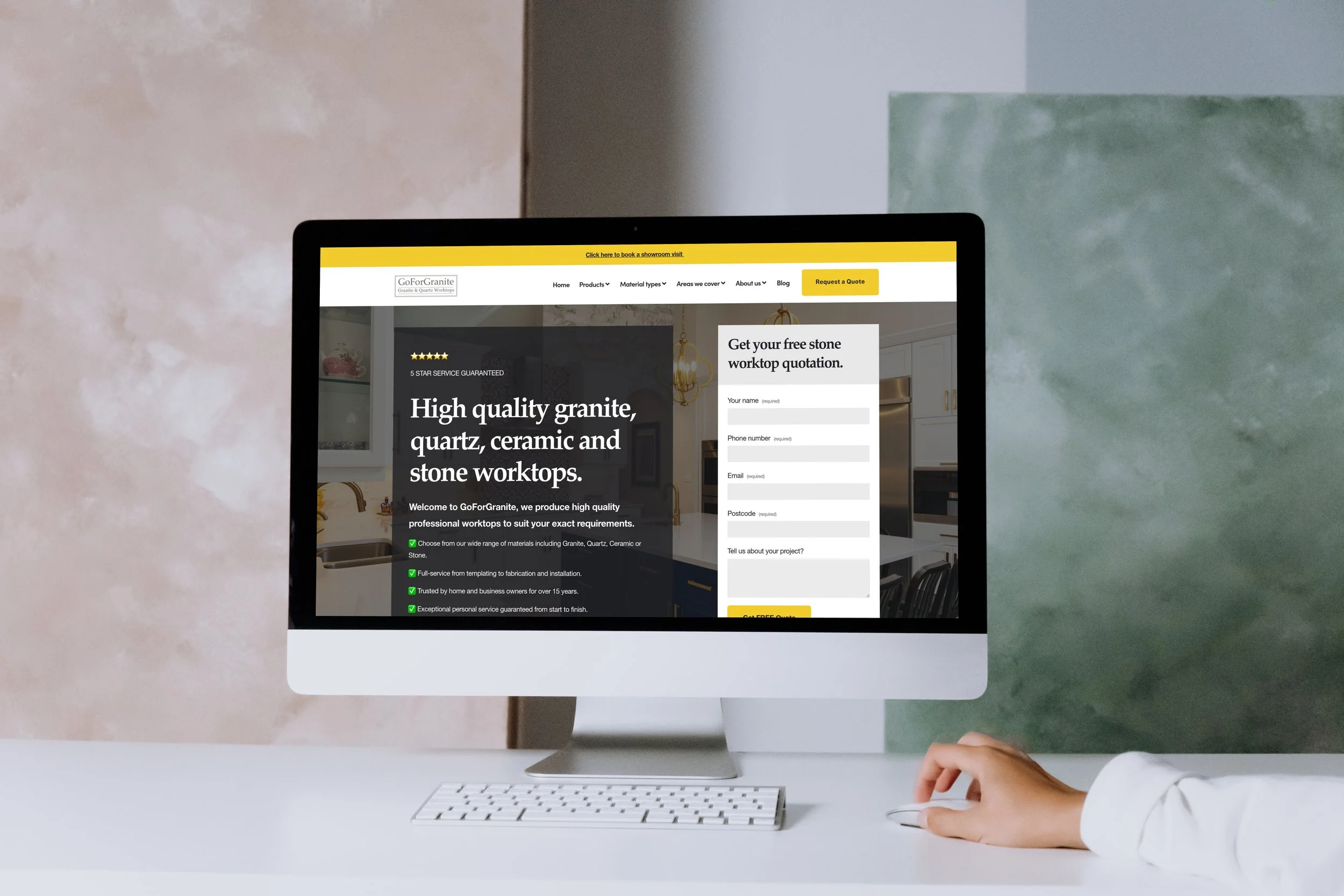
New website goes live for GoForGranite
Learn how we helped GoForGranite with a new website and strategic SEO.
Picture this: you're talented stone worktop specialists with decades years of experience creating beautiful kitchens, but you want to expand your reach to more customers online. That's exactly where GoForGranite found themselves when they first reached out to us at Midlands Digital.
When we started working together, GoForGranite had already established themselves as skilled craftspeople in the stone worktop industry. They know their stuff when it came to creating stunning granite, quartz, and marble surfaces, but they wanted to expand their business throughout the Midlands and South West UK. Our challenge? Getting their name in front of potential customers who were actively searching for their services.
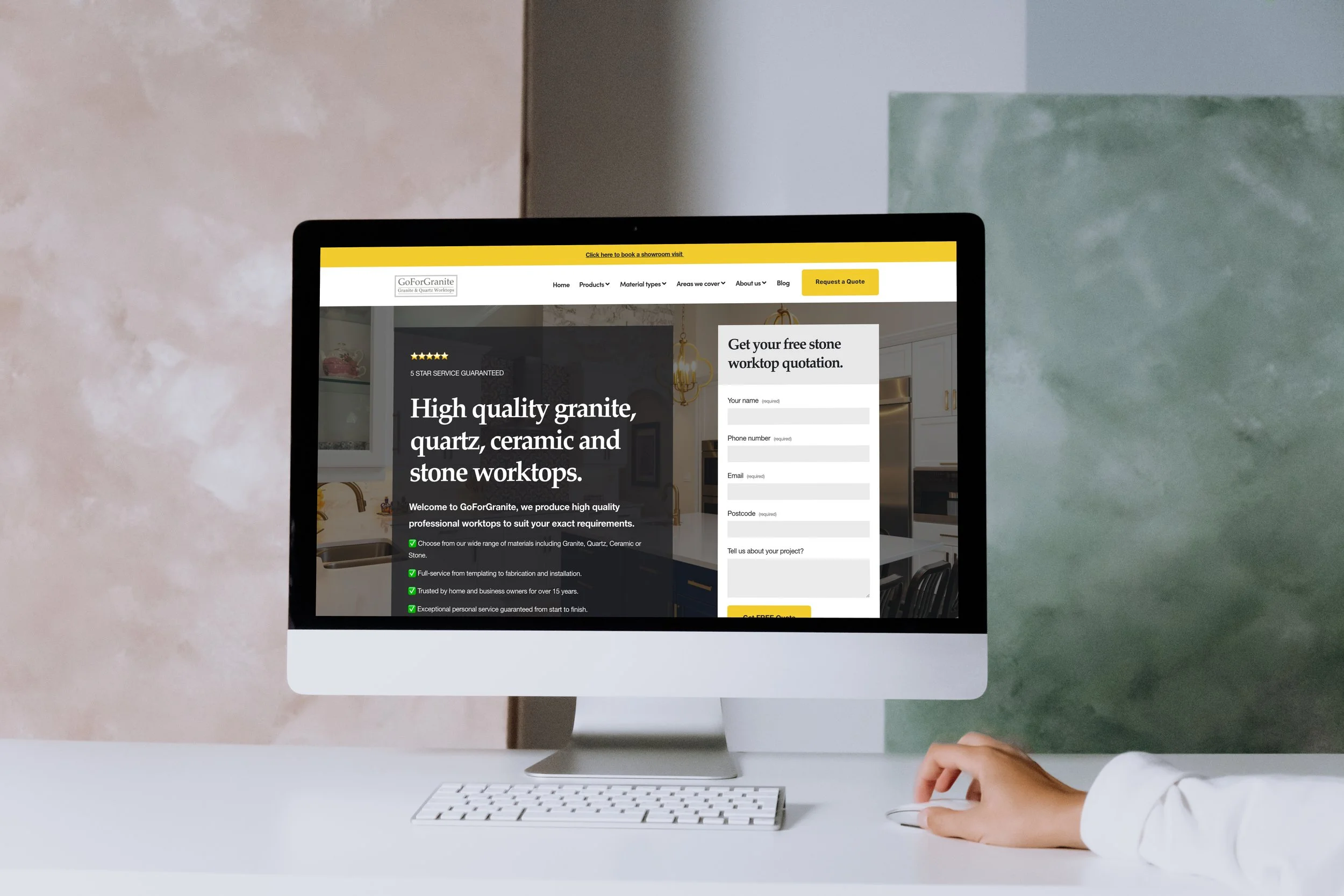
Expanding horizons
We began our partnership by focusing on what would make the biggest immediate impact—local SEO. Think of this as making sure GoForGranite showed up when someone in their immediate area typed "stone worktops near me" into Google. This wasn't about flashy marketing tactics; it was about building a solid foundation that would establish strong visibility in their core service areas.
The results were encouraging right from the start, giving GoForGranite that crucial initial momentum they needed to build their digital presence. But here's the thing about successful partnerships—they grow and evolve as the business does.
As GoForGranite began seeing success with their local visibility, their ambitions naturally grew too. They didn't want to just be the go-to stone worktop company in their immediate area; they wanted to capture customers across their entire service territory throughout the Midlands and South West.
This is where our strategy had to evolve. We shifted from focused local SEO to wider regional SEO tactics, helping GoForGranite show up for relevant searches across a much broader geographic area. It's one thing to rank well in your hometown—it's another challenge entirely to maintain visibility across multiple counties, cities and regions while still appearing relevant and trustworthy to potential customers.
The website rebuild
Then came the moment that really transformed everything. GoForGranite made the strategic decision to invest in a completely new website, but this wasn't just any website refresh. They instructed us to develop a premium digital platform that was specifically engineered for one primary purpose: generating high-quality homeowner leads.
This new website became something special. Instead of creating just another product showcase (which, let's be honest, is what most stone worktop companies do), we took a completely different approach. We meticulously optimised every piece of content to distinguish GoForGranite from their competitors in a crowded market.
Here's what made the difference: rather than simply displaying beautiful photos of granite worktops and listing services, the new website became an educational resource. We created content that actually helps homeowners understand the entire process—from selecting the right materials for their specific needs and budget, to understanding what's involved in the installation process, to learning how to properly maintain their investment for years to come.
This approach positioned GoForGranite as trusted advisors rather than just another supplier trying to make a sale. When potential customers land on their website, they don't just see pretty pictures (althugh there’s lots of those too!), they get genuine value and insights that help them make informed decisions about their kitchen renovation or new build project.
Connecting with the right audience
This content-rich, educational approach resonates particularly well with GoForGranite's ideal customers: discerning homeowners who are undertaking significant kitchen renovations or building new homes. These aren't impulse buyers—they're people who want to understand their options, compare materials thoughtfully, and work with professionals who can guide them through the process.
Today, GoForGranite's digital presence tells a compelling story. It effectively communicates both their exceptional craftsmanship and their consultative, customer-focused approach. More importantly, it generates a consistent flow of qualified homeowner leads throughout the Midlands and South West—not just any leads, but the right kind of leads from customers who understand the value of quality workmanship.
The website has become much more than a marketing tool; it's a valuable business asset that works around the clock. Not only does it attract new business, but it also sets proper expectations and educates potential clients before they even pick up the phone for their first consultation. This means smoother customer journeys, faster bookings, and ultimately higher satisfaction rates for both GoForGranite and their clients.
It's a perfect example of how the right digital strategy, executed thoughtfully and evolved over time, can transform a skilled local business into a regional leader in their industry.
Thanks for reading,
Ollie

Icequest partners with Midlands Digital to launch new website
Discover how we worked in collaboration with Icequest to design, develop and launch their new user-focussed website

Creating an engaging online presence is more important than ever, especially for businesses like activity venues that rely on foot traffic and customer interaction. Recently, a bustling activity venue based in Malvern, Worcestershire, offering attractions such as an ice rink, laser quest games, and escape rooms, recognised this need and decided to enhance their online presence.
Partnering with us at Midlands Digital we designed, built, and launched a new website that prioritises user engagement and helps simplify the booking process.
Research and collaboration
When we first connected with the Icequest, it became clear that they were eager to attract more visitors and improve their overall customer experience. The existing website had done a good job but there was room for improvement; to help potential customers easily navigate the site, find essential information, and ultimately book activities. This is where we stepped in, ready to create a solution tailored to their unique needs and goals.
Understanding the venue’s offerings was crucial to our approach. With diverse activities like ice skating, laser quest, and escape rooms, we knew the website needed to showcase these experiences effectively. We conducted a thorough analysis, engaging with the venue's management and staff to understand their vision and customer expectations. This collaborative phase set the foundation for a website design that truly reflected the spirit of the venue.
Designing a website that converts
Our focus on user engagement came into play during the design phase. We worked to create a friendly interface that invites users to explore the various activities on offer while ensuring that the booking process is smooth and straightforward. The thoughtful layout encourages visitors to delve into each offering, with a refreshed colour palette, clear descriptions, vibrant imagery, and engaging calls-to-action that naturally guide them toward making a reservation.
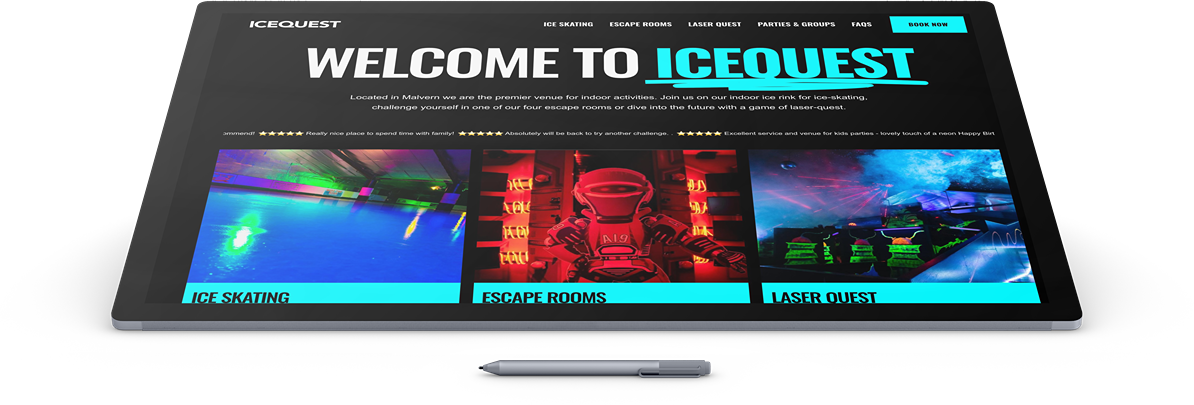
One of the key features we incorporated was to seamlessly integrate with their dynamic booking system, allowing visitors to see availability in real-time, select the date and time they wish to visit, and manage their bookings. This feature was vital, taking the guesswork out of planning a trip to the venue and eliminating potential frustration for both customers and staff. By making the booking process transparent and user-friendly, we aimed to improve booking conversion rates and boost overall satisfaction.
Responsive design was another critical aspect of our project. With data showing that many users accessed websites via their mobile devices, we ensured that the new site would offer an optimal experience across all platforms. Whether potential visitors were browsing on a desktop at work or checking out the ice skating times on their phone during their lunch break, the website’s performance would remain consistent and attractive.
Testing and launch
As we approached the launch phase, we also focused on SEO (search engine optimisation), implementing best practices to help the venue rank better in local search results and making it easier for local residents and visitors in Worcestershire to discover their fantastic offerings. By optimising web content and ensuring the site was structured for easy indexing by search engines, we aimed to increase organic traffic and visibility, driving more potential customers to the site.
After rigorous testing and refinements based on initial feedback, we launched the new website to great anticipation. Icequest was excited to unveil a platform that not only showcased what they offered but also provided an enjoyable user experience. Early metrics indicate increased user engagement, with more visitors spending time on the site and exploring different activities.
The partnership with Icequest exemplifies our commitment at Midlands Digital to fostering growth and success among our clients. By gaining a deep understanding of their needs and goals, we were able to design a website that effectively engages users but further streamlines the booking process.
We are excited to see how the venue continues to flourish as they welcome even more visitors to enjoy their ice rink, laser quest, and escape room experiences.
Thanks for reading,
Ollie
How to improve your websites conversion rate to generate more sales leads
Getting visitors to your website is only half the battle - turning those visitors into leads is what really matters. From clear calls-to-action to building trust through social proof, small changes to your website can make a big difference in generating more leads from your existing traffic.
As the managing director of Midlands Digital, I've witnessed firsthand the challenges businesses face when trying to generate quality leads.
The ‘digital landscape’ (urgh - I can’t stand this term!) is more competitive than ever, and while many businesses focus solely on driving traffic to their websites, they're missing a crucial piece of the puzzle: conversion rate optimisation (CRO).
The challenge of lead generation in today's market
Let me share a common scenario. Just last month, a business owner approached me with a familiar frustration. Their website was attracting decent traffic – around 10,000 visitors monthly – but only 1% were converting into leads. Despite investing thousands in advertising, they weren't seeing the return they needed. Does this sound familiar? If so, you're not alone, and you're about to discover how to change that.
Simply having a website isn't enough. Your online presence needs to work as hard as you do. The traditional approach of driving more and more traffic to an underperforming website is like pouring water into a leaky bucket – it's inefficient and expensive.
Here’s my top 10 tips for improving your website conversion rate:
1. Perfect your value proposition
The foundation of successful lead generation lies in your value proposition. The most common mistake I see is websites that fail to immediately answer the visitor's fundamental question: "What's in it for me?" Your value proposition needs to be crystal clear within seconds of someone landing on your page.
We recently worked with a manufacturing company that had a homepage filled with technical specifications and company history. After revamping their messaging to focus on how they solve their customers' problems, their conversion rate increased by 85% in just two months.
2. Optimise your forms strategically
Forms are the bridges between interest and action, between browsing and converting. Yet, they're often the most overlooked element in conversion rate optimisation. I frequently encounter businesses that spend thousands on driving traffic to their websites, only to lose potential leads at the final hurdle – a poorly designed form.
The psychology behind form completion is fascinating: every field you add creates friction, every question you ask increases the likelihood of abandonment.
But here's the paradox: while shorter forms generally convert better, they might not provide enough information to qualify leads effectively. Finding the right balance is crucial.
Through years of testing and optimisation, we've discovered that the art of form design goes far beyond just counting fields. It's about understanding user psychology, reducing cognitive load, and creating an experience that feels effortless.
From field order to error handling, from mobile optimisation to progress indicators, every element plays a crucial role in whether a visitor completes your form or abandons it.
Forms with 3-5 fields typically have the highest conversion rates
Adding unnecessary fields can reduce conversions by up to 25%
Clear error messages and real-time validation can increase completion rates by 30%
3. Implement compelling call-to-actions
The humble call-to-action (CTA) is perhaps the most undervalued element in the conversion optimisation toolkit. Many businesses treat their CTAs as an afterthought, defaulting to generic phrases like "Submit" or "Click Here." But here's the truth: your CTA is the tipping point between action and abandonment. It's the moment where your visitor decides whether to take the next step in their journey with you.
Think of your CTA as the digital equivalent of a sales conversation closer. Just as a skilled salesperson knows exactly what to say to move a prospect toward a decision, your CTA needs to provide that same gentle yet persuasive nudge.
Through extensive testing across hundreds of websites, we've found that the most effective CTAs share common characteristics: they create urgency without being pushy, communicate value clearly, and align perfectly with the visitor's current stage in their journey.
The art lies in finding the perfect balance between persuasion and authenticity.Some of our most successful variations include:
"Get Your Free Website Audit"
"Start Generating More Leads"
"Book Your Strategy Session"
"Get Your Custom Quote"
4. Leverage social proof effectively
In an age of increasing skepticism and information overload, social proof has become more crucial than ever. Yet, many businesses still treat testimonials and reviews as mere decorative elements on their websites.
The reality is that social proof is a psychological trigger that can make or break your conversion rates. When implemented strategically, it addresses one of the most fundamental human decision-making factors: the desire to make choices based on the experiences of others.
But here's what many don't realise: not all social proof is created equal. Generic testimonials and fake-looking reviews can actually harm your credibility rather than enhance it.
Through our work with hundreds of businesses, we've discovered that effective social proof needs to be specific, relevant, and, most importantly, authentic. It should tell a story that your potential customers can relate to, featuring real people who've faced similar challenges and found success through your solution.. We recommend:
Including detailed case studies with specific results
Displaying industry-specific testimonials
Incorporating trust badges and certifications
Showing real-time social proof
5. Optimise site performance
Speed isn't just a technical metric – it's a crucial business differentiator. The relationship between site performance and conversion rates is one of the most direct correlations we've observed in digital marketing. Yet, many businesses still treat page speed as a technical issue rather than a business-critical factor.
The modern user's patience is incredibly thin – studies show that 53% of mobile users will abandon a site that takes longer than three seconds to load. But the impact goes beyond just user experience; page speed is now a significant factor in search engine rankings and paid advertising quality scores.
Through our work optimising hundreds of websites, we've seen that even small improvements in load time can lead to substantial gains in conversion rates.
The challenge lies not just in making your site faster, but in maintaining that speed while delivering rich, engaging content that converts visitors into leads. Key optimisation strategies include:
Optimising image sizes and formats
Implementing efficient caching
Using content delivery networks (CDNs)
Minimising server response time
6. Create intuitive user journeys
The concept of user journey optimisation goes far beyond simple website navigation. It's about understanding and mapping the psychological process your visitors go through from the moment they land on your site to the point of conversion.
Many businesses make the mistake of designing their websites based on their internal organisation structure rather than their users' needs and expectations.
The result? Visitors feel lost, confused, or overwhelmed, leading to high bounce rates and lost opportunities.
Through analysing countless user sessions across various industries, we've discovered that successful user journeys share common characteristics: they're logical, frictionless, and aligned with the visitor's intent.
Every element on your page should serve a purpose in moving the visitor closer to conversion. This isn't just about having a clear navigation menu – it's about creating an experience that naturally guides visitors toward their goals while fulfilling your business objectives. Focus on:
Implementing clear navigation hierarchies
Using visual cues to guide attention
Creating logical content progression
Ensuring every page has a clear next step
7. Perfect your mobile experience
The shift to mobile-first browsing isn't just a trend – it's a fundamental change in how people interact with websites. Yet, many businesses still treat mobile optimisation as a checkbox item rather than a core strategy.
Here's a startling statistic: while over 60% of web traffic comes from mobile devices, mobile conversion rates often lag significantly behind desktop. This disconnect represents both a challenge and an opportunity.
The key lies in understanding that mobile users have different behaviors, expectations, and limitations compared to desktop users.
They're often in different contexts, have different attention spans, and face different technical constraints. Through extensive testing and optimisation, we've found that successful mobile experiences go far beyond responsive design.
It's about rethinking your entire conversion strategy from a mobile-first perspective, considering everything from touch targets to content hierarchy.. Key areas to focus on:
Simplified navigation for mobile users
Touch-friendly buttons and forms
Reduced content without losing value
Fast loading times on mobile networks
8. Implement effective testing strategies
A/B testing is often misunderstood and misapplied in the world of conversion optimisation. Many businesses fall into the trap of testing minor elements like button colors or font sizes while ignoring more impactful opportunities for improvement.
The truth is, effective testing isn't about making random changes and hoping for the best – it's about following a structured, hypothesis-driven approach to optimisation.
Through managing thousands of tests across various industries, we've learned that successful testing programs share common characteristics: they're based on data, focused on user behavior, and aligned with business objectives. The key is not just in running tests, but in running the right tests at the right time.
This means understanding your users' behavior, identifying real pain points, and formulating tests that address significant opportunities for improvement.
Headlines and value propositions
CTA text and placement
Form layouts and fields
Page layouts and content structure
9. Develop smart exit intent strategies
Exit intent optimisation is one of the most misunderstood aspects of conversion rate optimisation. Many businesses either ignore it completely or implement aggressive popup strategies that do more harm than good.
The reality is that exit intent represents a crucial last chance to engage with visitors who are about to leave your site – potentially forever.
But here's the key insight: effective exit intent strategies aren't about desperately trying to keep visitors on your site; they're about understanding why visitors are leaving and addressing their concerns or offering relevant alternatives.
Through analysing endless exit intent interactions, we've discovered that timing, relevance, and value proposition are crucial factors in success. The goal isn't to interrupt or annoy visitors but to provide a meaningful reason to stay engaged with your brand. Consider:
Offering valuable content downloads
Providing special offers or discounts
Showing social proof at the exit moment
Using personalised messages based on behavior
10. Focus on message consistency
Message consistency might sound like a basic principle, but it's one of the most commonly overlooked aspects of conversion optimisation. The disconnect between advertising messages and landing page content is a leading cause of poor conversion rates.
Think about it from the visitor's perspective: they click on an ad or search result promising one thing, only to land on a page that seems to be talking about something else entirely.
This misalignment creates cognitive dissonance and erodes trust.
Through analysing thousands of campaigns across various industries, we've found that maintaining message consistency throughout the user journey is crucial for conversion success.
It's not just about matching headlines and visuals; it's about ensuring every element of your page reinforces and builds upon the promise that brought the visitor there in the first place. Key aspects include:
Using consistent terminology
Maintaining visual continuity
Delivering on promotional promises
Addressing specific search intent
The impact of implementation
When implemented correctly, these strategies consistently deliver remarkable results. We recently worked with a B2B software company that applied these principles and saw their conversion rate increase from 2.3% to 6.8% over three months.
But remember, lead generation and conversion rate optimisation isn't a one-time effort – it's an ongoing process of testing, learning, and improving.
Taking the next step
Ready to transform your website into a lead-generation powerhouse? As experts in conversion rate optimisation to get more local leads we can help you implement these strategies effectively and sustainably so get in touch today to discover how we can help you generate more leads from your existing traffic.
That’s all for now, thanks for reading.
Ollie
Understanding search intent and why it matters
Understanding search intent is crucial for getting value from your website traffic - it's not about how many visitors you get, but whether they're actually looking to buy what you're selling. While a DIY enthusiast searching for "how to fix a leaking tap" might increase your traffic, it's the "emergency plumber near me" searches that actually generate leads.
If you're running a local business, getting more website traffic probably sounds like a good thing, right?
Well, not necessarily. In our years of helping small businesses grow online, we've learned that chasing high visitor numbers can actually be a waste of time and money. What really matters is attracting the right visitors - people who actually need your services and are ready to buy.
Why most traffic advice misses the mark
Let's be honest - there's a lot of noise out there about increasing website traffic. You've probably seen those promises: "Triple your website visitors!" or "Get thousands of new visitors overnight!" But here's the thing - if those visitors aren't looking for what you're selling, what's the point?
Think about it like this: If you're a plumber in Manchester, would you rather have 1,000 website visitors from around the world who are just browsing, or 50 local visitors who actually need a plumber right now? This is where understanding search intent becomes crucial for your business.
What is search intent (in plain English)?
Search intent is simply understanding what someone is actually trying to do when they type something into Google. Are they looking to buy something? Learn something? Find a specific website? Or are they just browsing?
When we work with local businesses, we often find they're targeting search terms that sound good but don't actually bring in customers. For example, if someone searches for "how to fix a leaking tap," they're probably trying to fix it themselves. But if they search for "emergency plumber near me," they're ready to hire someone right now. See the difference?
The four types of search intent that matter for your business
Let's break this down into what really matters for your business. There are four main types of searches people make:
Immediate need (buy now)
These are your gold-standard searches. Someone needs what you're selling, and they need it now. Think "emergency electrician London" or "24-hour plumber near me." These searches often lead to immediate enquiries because there's a urgent problem that needs solving.
Research and compare (buy soon)
These people are closer to making a decision but still comparing options. They're searching things like "best bathroom fitters in Birmingham" or "most reliable builders Manchester reviews." They're serious about buying but doing their homework first.
Information gathering (early stage)
These folks are just starting to look into something. They're searching for things like "how much does a new kitchen cost" or "types of home extensions." They might become customers eventually, but they're not ready yet.
Just browsing (not buying)
These are the tire-kickers - people who are just curious or killing time. They might be looking up "world's most expensive bathrooms" or "DIY plumbing tips." While they might be interested in your industry, they're not looking to hire anyone.
Why getting this wrong costs you money
Here's a real example we saw recently: A bathroom fitting company was spending a fortune on ads targeting people searching for "bathroom ideas." Sure, they got loads of website visitors, but hardly any leads. Why? Because most people searching for bathroom ideas are just dreaming or gathering inspiration - they're not ready to hire a bathroom fitter yet.
When we switched their focus to terms like "bathroom fitter near me" and "bathroom installation [location]," their overall traffic went down, but their leads went up. They were getting fewer visitors but making more money. That's the power of understanding search intent.
How to get local search intent right for your business
First, put yourself in your customer's shoes. What would someone type into Google if they needed your services right now? Those are the searches you want to target first.
Remember that different searches need different approaches:
For immediate need searches, make it super easy to contact you. These people don't want to read your company history - they want your phone number and to know you can help.
For research and compare searches, show why you're the best choice. Share reviews, case studies, and clear pricing information.
For information gathering searches, be helpful. Provide good information but make it clear how you can help when they're ready to take the next step.
Creating content that matches intent
Once you understand what your potential customers are actually searching for, you need to make sure your website gives them what they're looking for. If someone searches for an emergency plumber, they should land on a page that:
Makes it clear you handle emergencies
Shows your phone number prominently
Lists your service area
Demonstrates you can help right now
The role of local intent
For most small businesses, local intent is just as important as search intent. Someone searching for your services in London isn't helpful if you're based in Manchester. That's why we always combine search intent with local targeting to make sure you're not just getting the right kind of visitors, but the right kind of visitors from your service area.
Measuring what matters
Stop focusing on total visitor numbers. Instead, start tracking:
How many visitors actually contact you
Which searches lead to enquiries
How many of those enquiries turn into customers
Which parts of your service area generate the most leads
Taking action: What you can do now
Understanding search intent isn't just about getting better website traffic - it's about getting better leads and more customers. Start by looking at your current website analytics. Where are your visitors coming from? What are they searching for? Are these the kind of searches that indicate someone ready to buy?
Need help getting it right?
At Lead Builder, we specialize in helping small businesses attract the right kind of website traffic - visitors who are actually looking to buy what you're selling. Whether you need help understanding your current traffic, improving your website's performance, or developing a strategy to attract better leads, we're here to help.
Want to learn more about getting better quality traffic to your website? Sign up for our newsletter for free tips and guides, or get in touch to discuss how we can help transform your online presence into a reliable source of quality leads.
That’s all for now, thanks for reading.
Ollie
Why your website's not getting you leads: A deep dive into the digital sales funnel
Most business websites fail to generate leads because they're missing one or more of the three essential elements: getting found, engaging visitors, and following up effectively. Get these three pillars working together and you'll transform your website from a digital business card into a reliable source of new business.
Let's be honest - is your website actually bringing in leads for your business, or is it just sitting there looking pretty?
If you're like many of the small business owners we talk to, you might be wondering why your website isn't delivering the results you expected. The good news? You're not alone, and more importantly, this is something we can fix.
Having helped hundreds of UK businesses transform their online presence, we've seen firsthand that getting leads from your website isn't about flashy designs or complicated features. It's about getting the fundamentals right.
Think of it like a traditional sales process - you need to get found, engage potential customers, and follow up effectively. Let's break this down into plain English and look at what might be going wrong with your website.
The three pillars of website lead generation
Picture your website as a shop on the high street. Having a beautiful storefront is great, but if people can't find you, if they walk straight past without coming in, or if no one follows up with interested customers, you're losing business. The same principles apply online, and understanding these three pillars is crucial for turning your website into a lead-generating machine.
1. Getting found: The traffic challenge
Here's a question we often hear: "Why isn't anyone finding my website?" The truth is, being online isn't enough anymore. You need to be visible to the right people at the right time. Many business owners we work with are surprised to learn that their website is practically invisible to their target customers.
The most common issue we see is websites that aren't properly optimized for local search. Think about it - when someone in your area needs your services, they're probably typing something like "plumber near me" or "local electrician" into Google. If your website isn't set up to appear in these searches, you're missing out on valuable leads.
Another crucial factor is your Google Business Profile. This is essentially your digital shopfront on Google, and it needs to be working hard for you. We've seen businesses transform their online visibility simply by properly optimizing their profile with the right information and regular updates.
Content also plays a vital role in getting found. But we're not talking about writing essays about your industry - it's about answering the questions your potential customers are actually asking. Every day, people in your area are searching for solutions to problems that your business can solve. Your website needs to provide these answers in a clear, straightforward way.
2. Engaging visitors: The conversion challenge
So you're getting people to your website - great! But what happens when they get there? This is where many businesses stumble. Having visitors leave without taking action is like having potential customers walk into your shop, look around, and walk straight back out without speaking to anyone.
The key to engagement is making it crystal clear what you want visitors to do and why they should do it. We often see websites that look professional but fail to convince visitors to take the next step. Your website needs to quickly answer three questions: What do you do? How can you help me? And what should I do next?
Think about your own experience when you visit a website. If you can't immediately find what you're looking for, or if it's not clear how to get in touch, you'll probably leave. That's exactly what's happening to your potential customers if your website isn't properly structured.
A common mistake we see is businesses hiding their contact information or making it complicated to get in touch. Every extra click or form field is another opportunity for a potential lead to give up. Make it easy for people to reach you - whether that's through a simple contact form, a prominent phone number, or a clear 'Book Now' button.
3. Following up: The closing challenge
This is where most websites really fall down, and it's costing businesses serious money. Getting leads is only half the battle - what you do with those leads matters just as much. We've seen countless businesses lose potential customers simply because they didn't have a proper follow-up system in place.
The harsh reality is that in today's market, people expect quick responses. If someone fills out your contact form and doesn't hear back for days, they've probably already found another business to help them. The most successful businesses we work with have a clear process for handling leads - from the moment an enquiry comes in to following up after the job is done.
But it's not just about speed - it's about having a systematic approach to nurturing leads. Not everyone who contacts you will be ready to buy immediately. Having a process to stay in touch and provide value over time can turn today's enquiries into tomorrow's customers.
Building a complete lead generation system
The secret to success is getting all three of these elements working together effectively. It's like a three-legged stool - if one leg is weak, the whole thing falls over. We see this all the time with businesses that focus too heavily on just one aspect of their online presence while neglecting the others.
Let me give you a real example:
We recently worked with a small home improvements firm where the owner was spending a fortune on Google Ads. He was getting plenty of visitors to his website - that first pillar of visibility was strong. But his website wasn't engaging those visitors effectively, and he no solid system for following up with leads. He was essentially paying for traffic that wasn't converting into business. It's a common story, and it's like filling a bucket with holes - no matter how much water you pour in, you're never going to fill it up.
On the flip side, we've seen businesses with beautiful, engaging websites that convert visitors brilliantly - but they're getting hardly any traffic. Or others who are great at following up with leads but aren't getting enough enquiries because their website isn't visible to their target audience. In each case, the weak link in the chain is holding back the entire system.
The businesses that truly succeed online are those that understand how these elements work together. When your website is visible to the right people, engages them effectively when they arrive, and is backed by solid follow-up systems, it creates a smooth journey from initial search to satisfied customer. It's about creating a complete ecosystem where each element supports and enhances the others.
Think about it this way:
Getting found online brings people to your digital shopfront. Your engaging website is like your best salesperson, available 24/7 to talk to potential customers. And your follow-up system is like having a dedicated team ensuring no opportunity slips through the cracks. When all three work together, they create a reliable, predictable system for generating leads and turning them into paying customers.
The good news is that you don't need to perfect all three elements at once. The key is understanding how they work together and making incremental improvements across each area. Start by identifying which 'leg of the stool' is weakest in your business, and focus on bringing it up to par with the others. Then you can work on optimising each element until you have a well-oiled lead generation machine working for your business around the clock.
Taking Action: What you can do now
If you're reading this and recognising some of these issues with your own website, don't worry. Every business we've helped started somewhere, and the fact that you're aware of these challenges is the first step to solving them.
Start by looking at your website through your customers' eyes. Try searching for your services online and see if you can find your business. When you visit your website, is it immediately clear what you do and how someone can get in touch? And when you do get enquiries, how quickly and effectively are you following up?
Need Expert Help?
At Lead Builder, we specialise in transforming websites into effective lead generation tools for small businesses. We understand that you're busy running your business - you shouldn't need a PhD in digital marketing to get leads from your website.
That's why we've developed straightforward systems to help businesses like yours get found online, engage potential customers, and convert more leads into paying customers. Whether you need help with one aspect or want to transform your entire online presence, we're here to help you get the leads your business deserves.
Want to learn more about improving your website's lead generation? Sign up for our newsletter for free tips and guides, or get in touch to discuss how we can help transform your online presence into a reliable source of quality leads.
That’s all for now, thanks for reading.
Ollie
How to choose the best social media platform for your business.
Choosing the right social media platform isn't about being everywhere - it's about being where your customers are looking for services like yours. Each platform has unique strengths: Facebook for service businesses, Instagram for visual content, and LinkedIn for B2B connections. Start with one platform that best matches your business, master it, and focus on what actually brings in local leads.
It’s 2025 and social media isn't just a nice-to-have – it's essential for local businesses looking to generate quality leads. But with so many platforms available, how do you know which ones are worth your time and effort?
As specialists in helping small businesses grow their online presence, we've created this straightforward guide to help you make the right choice for your business.
Why social media matters for your local businesses
In today's digital age, having a strong social media presence isn't just about keeping up with the times – it's about survival and growth in an increasingly competitive marketplace. For local businesses, particularly trades and small enterprises, social media represents an unprecedented opportunity to connect with potential customers in your area without the massive budgets typically required for traditional advertising.
We've seen countless businesses transform their lead generation through strategic social media use, but the key word here is 'strategic.' The reality is that many small business owners waste countless hours and resources on social media activities that don't generate returns, simply because they're following generic advice that isn't tailored to local business needs.
What makes social media particularly powerful for local businesses is its ability to create genuine connections within your community.
Unlike traditional advertising, which often feels one-directional, social media allows you to engage in real conversations with potential customers, showcase your expertise, and build trust through transparency and consistent communication.
It's about creating a digital word-of-mouth effect that amplifies your existing reputation and helps you reach new customers who might never have found you through traditional channels.
The key benefits of social media for local businesses include:
Direct engagement with your local community
Showcase of your work and expertise
Building trust through customer reviews and testimonials
Cost-effective local advertising opportunities
Improved local SEO and online visibility
Understanding Your Business Goals and Audience
Before you even think about which social media platforms to use, it's crucial to step back and take a hard look at what you're trying to achieve. Too often, we see small businesses jump into social media because they feel they "should," without a clear understanding of how it fits into their broader business strategy.
This approach usually leads to wasted time and frustration. Instead, we need to start with a clear-eyed assessment of your business goals, target audience, and available resources. This foundational work might seem basic, but it's absolutely critical to your success on social media.
Having worked with hundreds of local businesses, we've learned that the most successful social media strategies are built on a deep understanding of both the business's capabilities and their customers' needs.
This isn't about following trends or copying competitors – it's about creating a sustainable approach that generates real leads for your business. The beauty of social media is its flexibility, but this also means you need to be crystal clear about your objectives to avoid getting lost in the noise.
To begin this process of alignment, ask yourself:
Who are your ideal customers, and where do they spend their time online?
What type of content can you realistically create and maintain?
What are your primary business goals? (Lead generation, brand awareness, customer service)
How much time can you dedicate to social media management?
Breaking down the top social media platforms for local businesses
Navigating the world of social media platforms can feel overwhelming, especially when you're trying to run a business at the same time. Each platform has its own unique features, audience demographics, and best practices, and these are constantly evolving.
Through our work with local businesses across the UK, we've seen firsthand which platforms truly deliver results for different types of businesses. The key is understanding that you don't need to be everywhere – you just need to be where your potential customers are looking for services like yours.
What makes this particularly challenging for local businesses is that most social media advice is geared toward national brands or e-commerce businesses. The strategies that work for them often don't translate well to local service providers and trades.
That's why we've focused this breakdown specifically on how each platform can work for local businesses, based on real-world experience and results. We'll cut through the noise and focus on what actually matters for generating local leads.
Facebook: The All-Rounder
Best for: Service-based businesses, retail, and professional services
Facebook remains the most versatile platform for local businesses. With over 2.9 billion active users and robust business features, it's often the best starting point for small businesses.
Key Benefits:
Facebook Business Pages with built-in lead generation tools
Local awareness ads with geographic targeting
Facebook Groups for community engagement
Customer reviews and recommendations
Event promotion capabilities
Perfect for: Plumbers, electricians, builders, and other trades who want to showcase their work and gather customer reviews.
Instagram: Visual impact
Best for: Businesses with strong visual elements
If your work creates visible transformations or you can showcase your expertise through images and short videos, Instagram could be your golden ticket.
Key Benefits:
Before/after project showcases
Instagram Stories for behind-the-scenes content
Shopping features for product-based businesses
Location tagging for local visibility
Reels for educational content
Perfect for: Landscapers, interior designers, builders, and businesses with visual products or services.
LinkedIn: Professional networking
Best for: B2B services and professional services
While not typically associated with local lead generation, LinkedIn can be powerful for businesses targeting other businesses or professionals.
Key Benefits:
Professional networking opportunities
Content sharing to establish expertise
B2B lead generation
Industry news and updates
Career opportunities and recruitment
Perfect for: Business consultants, commercial services, and professional service providers.
Google Business Profile: The local SEO powerhouse
Although not traditionally considered social media, your Google Business Profile (formerly Google My Business) is crucial for local visibility.
Key Benefits:
Direct impact on local search rankings
Customer reviews and ratings
Post updates and offers
Direct messaging from potential customers
Integration with Google Maps
Perfect for: All local businesses, especially those relying on geographic-based searches.
Creating your social media strategy
The difference between businesses that succeed on social media and those that struggle often comes down to one thing: having a clear, actionable strategy. But here's the thing – you don't need a complicated 50-page document to have an effective social media strategy.
What you need is a practical approach that you can actually implement while running your business. Through our experience working with local trades and small businesses, we've developed a straightforward framework that delivers results without requiring hours of daily social media management.
The key to success is understanding that social media isn't about constant posting or having the most followers – it's about connecting with the right people in the right way to generate genuine leads for your business. Your strategy should focus on sustainable practices that you can maintain long-term, even during your busiest periods. Remember, consistency beats perfection every time when it comes to social media marketing.
We've found that the most successful local businesses approach social media with a clear plan that focuses on their strengths and available resources. Let's break down the essential elements of a social media strategy that works for real-world small businesses:
1. Start Small and Scale Up
Don't try to be everywhere at once. Pick one or two platforms that align best with your business goals and master them before expanding.
2. Content Planning
Create a simple content calendar focusing on:
Project showcases
Customer testimonials
Educational content
Behind-the-scenes insights
Local community engagement
Special offers and promotions
3. Engagement Strategy
Remember, social media is about being social. Plan to:
Respond to comments and messages promptly
Engage with local community posts
Share customer success stories
Address feedback and reviews professionally
4. Measuring Success
Focus on metrics that matter:
Lead generation (messages, calls, enquiries)
Post engagement rates
Follower growth in your target area
Website traffic from social media
Conversion rates from social media visitors
Common pitfalls to avoid
In our years of helping local businesses with their social media presence, we've seen certain mistakes come up time and time again. These pitfalls aren't just minor inconveniences – they can seriously impact your ability to generate leads and grow your business through social media. The frustrating thing is that most of these mistakes are completely avoidable with the right knowledge and approach.
What makes these pitfalls particularly dangerous is that they often seem like the right thing to do at first. You might think that posting more content or being on every platform will lead to better results, but the reality is quite different. We've seen countless businesses waste valuable time and resources on activities that don't generate returns, simply because they're following conventional wisdom that doesn't apply to local business needs.
Understanding these common mistakes and how to avoid them can save you months of frustration and help you build a social media presence that actually generates leads for your business. Here are the key pitfalls we see most often, along with practical advice on how to avoid them:
Spreading Yourself Too Thin: Focus on quality over quantity
Inconsistent Posting: Set a realistic schedule you can maintain
Ignoring Analytics: Regular review of what works helps refine your strategy
Poor Response Times: Quick responses to enquiries are crucial for converting leads
Neglecting Local Focus: Always emphasise your local presence and community connection
Making the final choice
After absorbing all this information about different platforms, strategies, and potential pitfalls, you might be feeling a bit overwhelmed. That's completely normal – choosing the right social media platform is a significant decision that can impact your business's growth trajectory. However, it's important to remember that this isn't a permanent, unchangeable choice. The beauty of social media marketing is its flexibility and the ability to adjust your approach based on results.
What we've found through working with hundreds of local businesses is that success often comes from starting with a focused approach and expanding based on proven results. This means choosing a platform that aligns with your current capabilities and business goals, rather than trying to predict every possible future scenario. The key is to make an informed decision based on your specific situation, rather than following general trends or copying competitors who might have very different resources and objectives.
To help you make this crucial decision, we've distilled our years of experience down to three key factors that should guide your choice. These factors have proven to be reliable indicators of social media success for local businesses across various industries:
The best social media platform for your business depends on three key factors:
Where your target customers spend their time
The type of content you can consistently create
Your available resources for social media management
Next Steps for Success
Ready to get started? Here's your simple action plan:
Choose your primary platform based on this guide
Set up your business profile completely
Create a simple content plan for the next month
Start posting consistently
Monitor results and adjust as needed
Need help getting started?
Want to learn more about growing your business online? Sign up for our newsletter for free DIY tips and digital marketing guides, or get in touch to discuss how we can help you generate the leads your business deserves.
That’s all for now, thanks for reading.
Ollie
How to setup Google Search Console
If you're running a business website but feeling frustrated about your visibility in Google search results, you're not alone. Here’s how to setup Google very own free Search Console tool where you can track, manage and maintain your presence in Google Search.
If you're running a business website but feeling frustrated about your visibility in Google search results, you're not alone. I meet business owners every day who are investing time and money into their websites but still struggling to understand if Google can even see their pages properly. It's like having a shop with no way to know if your door sign is visible from the street.
Why Your Business Needs Google Search Console
Let me share something I've learned from helping hundreds of businesses improve their online presence: having a website without Google Search Console is like trying to run a business without looking at your sales data. You're essentially operating blind. I've seen too many businesses waste months publishing content or launching new services online without realizing Google isn't even indexing their pages properly.
Think about this for a moment - how do you currently know if Google can find and understand your website? If you're like most business owners I talk to, you probably don't. You might be checking your rankings occasionally or looking at your analytics, but that's only telling you part of the story.
The reality is that the digital landscape has become increasingly competitive. Just last month, I worked with a client who had invested thousands in their website redesign, only to discover their developer had accidentally blocked Google from indexing their entire site. Without Google Search Console, they might have gone months without realizing why their traffic had dropped so dramatically.
But it's not just about catching technical issues. In today's digital-first world, your website is often the first point of contact between your business and potential customers. Understanding how these potential customers find you - or why they're not finding you - is crucial for sustainable business growth.
Let me paint a picture of what typically happens without proper search visibility monitoring. You invest in creating quality content, perhaps even hire a copywriter to write engaging blog posts or service pages. You share these on social media, maybe even run some ads. But months go by, and you're not seeing any organic traffic growth. Why? Often, it's because:
Google might be struggling to understand your site structure
Your most important pages might be buried too deep in your website
Your mobile version might be presenting issues to search engines
Critical pages might be accidentally blocked from search engines
Your site might have technical issues affecting its performance
Google Search Console alerts you to all these issues and more. It's like having a direct line to Google, telling you exactly what's working and what isn't on your website.
I often use this analogy with clients: imagine you're running a physical store, but you have no way to know if your signage is visible, if your door is actually open, or if customers can find their way around once they're inside. That's essentially what you're doing if you're running a website without Google Search Console.
Another crucial aspect that many business owners overlook is the impact of website changes. Every time you update your website - whether it's adding new products, changing your service offerings, or even just updating your contact information - you need to ensure these changes are properly reflected in Google's understanding of your site. Google Search Console gives you the tools to do this effectively.
The platform also provides invaluable insights into your market and audience. Through the search queries report, you can understand exactly what potential customers are searching for when they find your website. This information is gold dust for any business owner looking to align their offerings with market demand.
From my experience working with hundreds of SMEs, businesses that actively use Google Search Console typically see improvements in their search visibility within 3-6 months, simply because they're able to identify and fix issues that would otherwise go unnoticed. It's like having a 24/7 website consultant who's constantly monitoring your site's health and performance in Google's eyes.
Getting Started: Setting up Google search console
The good news is that setting up Google Search Console is completely free, and while it might look technical at first glance, I'm going to walk you through the process step by step, just as I do with my clients.
Before we dive into the technical setup, let's address something important: many business owners put this off because they think it's too complicated or they're worried about breaking something on their website. I want to assure you that Google Search Console is completely safe to set up - it's a read-only tool that can't make changes to your website. The worst that can happen is that you don't verify your site correctly, in which case you simply try again.
One question I often get is about timing - when is the best time to set up Google Search Console? The answer is always "right now." Whether your website is brand new or has been around for years, the sooner you set it up, the sooner you can start gathering valuable data about your site's performance in search results.
Step 1: Accessing Google search console
First, head over to search.google.com/search-console. You'll need to sign in with a Google account - ideally the same one you use for other Google services related to your business. If you don't have one yet, it's worth creating a dedicated Google account for your business rather than using a personal one.
Step 2: Adding your property
Once you're logged in, you'll see a button to add a new property. Let me explain what a property is in Google Search Console - I'll break this down in a clear and practical way.
A property in Google Search Console is basically how you tell Google which website or part of a website you want to monitor and manage. Think of it like registering a property you own - you're telling Google "this is my website, and I want to see how it's performing in search results."
There are two main types of properties you can add:
Domain Property:
Covers your entire domain and all its variations (www, non-www, http, https, and all subdomains)
Example: it would cover all of these:
example.com
www.example.com
shop.example.com
blog.example.com
Requires DNS verification (adding a TXT record to your domain settings)
Generally preferred for most businesses as it gives you complete coverage
URL-prefix Property:
Covers only a specific URL version of your site
Example: if you add https://www.example.com, it only covers that exact prefix
Doesn't automatically include subdomains or other variations
Easier to verify (multiple verification methods available)
Useful when you only need to monitor a specific section of your site
An everyday analogy would be:
A Domain Property is like having access to monitor an entire apartment building
A URL-prefix Property is like having access to just one specific apartment
For most business owners, I recommend setting up a Domain Property because:
You get complete visibility of your entire domain
You don't miss any data from different versions of your site
You only need to manage one property instead of multiple ones
It future-proofs your setup if you add subdomains later
For most businesses, I recommend the domain property option as it gives you the most comprehensive coverage. However, today we're going to focus on the URL-prefix property, as it's often easier to verify, especially if you're doing this yourself.
Step 3: Verification - Making It Simple
Here's where many business owners get stuck, but don't worry - I'm going to make this as straightforward as possible. While Google offers several verification methods, I've found that using the HTML meta tag is often the easiest approach, especially for self-managed websites.
Let me break down how to add the verification meta tag based on your website platform:
For WordPress Users:
Copy the meta tag provided by Google Search Console
If you're using a SEO plugin like Yoast or RankMath:
Go to the SEO plugin settings
Look for "Webmaster Tools" or "Search Console" settings
Paste your meta tag ID (just the content part) into the Google verification field
If you're not using an SEO plugin:
Install a header and footer plugin
Paste the complete meta tag into the header section
For Shopify Users:
From your Shopify admin, go to Online Store > Themes
Click "Actions" then "Edit code"
In the Layout section, click on "theme.liquid"
Paste the meta tag just before the closing </head> tag
Save the changes
For Squarespace Users:
Go to Settings > Advanced > Code Injection
Paste the meta tag into the Header section
Save your changes
For Wix Users:
Go to Marketing & SEO > SEO Tools > Site Verification
Click on Google
Paste the meta tag ID (just the content part)
Save your settings
Step 4: Confirming Verification
Once you've added the meta tag, return to Google Search Console and click "Verify." Don't worry if it doesn't work immediately - sometimes it takes a few minutes for the verification to process. If you get an error, double-check that you've pasted the entire meta tag correctly and that it's in the right location.
Another important aspect to consider during setup is user management. If you work with a team or external consultants, Google Search Console allows you to grant different levels of access to different users. This means you can give your SEO consultant access to the data they need while maintaining overall control of your account. To do this, once you're verified:
Click on the settings icon in GSC
Select "Users and permissions"
Click "Add user"
Enter their email and select their permission level
This flexibility in user management ensures you can collaborate effectively while maintaining security over your data.
Making the Most of Google Search Console
Now that you're verified, let's focus on the features that will give you the most immediate value. Based on my experience helping businesses improve their search visibility, these are the three areas you should focus on first:
1. Submitting Your Sitemap
A sitemap is exactly what it sounds like - it's a map of your website that helps search engines understand how your content is organized. Think of it as a blueprint of your website that lists all your important pages in an organized way that search engines can easily read and understand.
Technically speaking, a sitemap is an XML file that lives on your website (usually at yourwebsite.com/sitemap.xml) and contains a list of all the pages you want search engines to know about. Each entry in the sitemap includes the page URL and can also contain additional information. This includes details like when the page was last updated, how often the page typically changes, how important this page is relative to other pages on your site, and any images or videos associated with the page.
Sitemaps are important for several key reasons. First, they help search engines discover all your important pages. This is especially crucial if your site is new and doesn't have many external links, you have pages that aren't well-linked from other parts of your site, or your site is large with hundreds or thousands of pages. Second, they speed up the discovery of new content - when you add new pages or blog posts, having them in your sitemap helps Google find and index them faster. Third, they can help you prioritize your content, as through sitemap settings, you can indicate which pages are most important on your site.
Most modern content management systems like WordPress, Shopify, or Wix automatically generate and update your sitemap. If you're using WordPress with an SEO plugin like Yoast or Rank Math, they'll handle this for you. The sitemap updates automatically when you add or remove pages, making the process seamless and hands-off.
A common misconception is that sitemaps help with rankings - they don't directly. What they do is ensure search engines can find and index all your important pages. Think of it like this: a sitemap doesn't help you win the race, but it makes sure you're at least at the starting line. For new websites or sites that are frequently updated, a sitemap is particularly crucial. It's one of the fastest ways to get your content into Google's index, especially if your site's internal linking structure isn't perfect (which is common for newer sites).
Here's a real-world example: I recently worked with a client whose blog posts weren't appearing in Google search results. Upon investigation, we discovered their sitemap wasn't updating when new posts were published. After fixing this issue, their new content started appearing in search results within days rather than weeks. This illustrates how crucial a properly functioning sitemap can be for content visibility.
The best practice is to submit your sitemap directly to Google through Search Console. This tells Google exactly where to look for information about your site's structure and content. While Google might eventually find your pages without a sitemap, why make it harder for them? A well-structured sitemap is like giving Google a guided tour of your website instead of letting them wander around hoping to find everything important. It's a simple yet powerful tool that ensures your content has the best possible chance of being discovered and indexed by search engines.
Think of your sitemap as a map of your website for Google. Here's how to submit it:
Go to the "Sitemaps" section in the left menu
Enter your sitemap URL (typically yourwebsite.com/sitemap.xml)
Click "Submit"
If you're using WordPress with Yoast or RankMath, your sitemap is automatically generated. For other platforms:
Shopify: /sitemap.xml
Squarespace: /sitemap.xml
Wix: automatically submitted
2. URL Inspection Tool
A URL (Uniform Resource Locator) is the unique web address that identifies each page on your website. Think of it as a digital postal address - just as every building needs a unique address to receive mail, every page on your website needs a unique URL to be found by both users and search engines.
At its most basic level, a URL consists of several key components that work together to specify exactly where a web resource is located. The structure typically starts with the protocol (usually 'https://' nowadays), followed by your domain name, and then any additional paths or parameters that lead to specific content. For instance, in the URL 'https://example.com/blog/article-name', 'https://' is the protocol, 'example.com' is the domain, '/blog/' is a directory, and 'article-name' is the specific page.
Creating effective URLs is crucial for both user experience and search engine optimisation. Good URLs are readable, memorable, and give users a clear idea of what they'll find on the page before they click. They should be descriptive but concise, using real words rather than strings of numbers or codes. For instance, 'example.com/red-running-shoes' is much better than 'example.com/product?id=123456'.
URL structure also plays a vital role in how search engines understand your website's architecture. When you organize your URLs logically, you create a clear hierarchy that helps search engines understand the relationship between different pages on your site. For example, 'example.com/shoes/running/red-trainer' clearly shows that this product belongs in the shoes category, specifically in the running subcategory.
Security is another crucial aspect of URLs in modern web usage. The 'https://' protocol we mentioned earlier isn't just part of the address - it indicates that the connection between the user's browser and your website is encrypted. This is now essentially mandatory for any serious website, especially those handling sensitive information or conducting e-commerce.
One of the most common issues I see with URLs is poor handling of changes. When you change a URL, you need to implement proper redirects to ensure both users and search engines can still find the content. I recently worked with a client who changed their product URLs without redirects, leading to a significant drop in traffic as all their previous links became dead ends. We implemented 301 redirects from the old URLs to the new ones, and their traffic recovered within weeks.
URL parameters, those extra bits you sometimes see after a question mark in a URL (like '?color=red&size=large'), can be particularly tricky. While they're useful for tracking and filtering, too many parameters can confuse search engines and make your URLs less user-friendly. It's often better to create clean, static URLs where possible and use parameters only when necessary.
A critical consideration for URLs is case sensitivity. While technically 'example.com/Page' and 'example.com/page' can point to different locations, it's best practice to stick to lowercase URLs to avoid confusion and potential duplicate content issues. Many websites I've audited have lost search visibility because they accidentally created multiple versions of the same content with different URL cases.
The length of URLs also matters. While there's no strict limit, shorter URLs are generally better - they're easier to share, less likely to break when copied, and tend to perform better in search results. However, don't sacrifice clarity for brevity. A slightly longer, descriptive URL is better than a short, cryptic one.
Remember that URLs are one of the most permanent parts of your website's architecture. While you can change them if needed, doing so requires careful planning and implementation to avoid losing the authority and rankings you've built up over time. That's why it's crucial to get your URL structure right from the start, thinking about both current needs and future scalability.
And this leds on to the URL inspection tool.
The URL Inspection tool in Google Search Console is one of its most powerful features, acting like a direct line of communication with Google about any specific page on your website. It's the tool you use when you want to understand exactly how Google sees and interprets any URL on your site.
When you enter a URL into the inspection tool, Google provides you with detailed information about that page's current status in their index. It tells you whether the page can be indexed, if it's currently in Google's index, and if there are any technical issues preventing it from being shown in search results. Think of it as getting a health check-up for any page on your website.
The tool is particularly valuable when you've made significant changes to a page or launched new content. Instead of waiting for Google to naturally discover your changes, you can use the URL Inspection tool to request immediate indexing. This is especially useful for time-sensitive content like event pages or important announcements. However, it's worth noting that requesting indexing doesn't guarantee the page will be indexed - it still needs to meet Google's quality standards.
What makes this tool particularly useful is its diagnostic capabilities. If there are problems with a page, the URL Inspection tool will tell you exactly what's wrong. It might flag mobile usability issues, highlight problems with your structured data, or alert you to blocked resources that are preventing proper indexing. Having this level of insight means you can fix issues before they impact your search visibility, rather than wondering why a page isn't performing as expected in search results.
Use it when:
You've published a new important page and want Google to know about it immediately
You've made significant updates to an existing page
You want to check why a page isn't showing up in search results
Simply paste your URL into the inspection tool, and Google will tell you if there are any problems it's encountering when trying to show your page in search results.
3. Performance Report
This is where you'll find the real gold, the actual data about how your website appears in Google searches.
The Performance Report in Google Search Console is your window into how your website truly performs in Google's search results. Unlike basic analytics that only show you who visited your site, this report reveals the full story of your search presence - including the searches you appeared in but didn't get clicks from. It's like having a behind-the-scenes look at every time your website shows up in Google's results.
When you first open the Performance Report, you're presented with four key metrics that tell different parts of your visibility story. Total clicks show you how many times users actually visited your site from search results. Impressions reveal how many times users saw your site in search results, even if they didn't click. Your average click-through rate (CTR) helps you understand how compelling your search listings are to potential visitors. And your average position shows where you typically rank in search results.
What makes this report particularly valuable is its ability to show you the actual search terms people are using to find your website. This isn't just numbers and data - it's real insight into what your potential customers are looking for. I often find businesses discover entirely new opportunities when they see the variety of searches they're appearing for. Recently, I worked with a client who discovered their product pages were appearing for problem-based searches they hadn't even considered targeting.
The real power of the Performance Report lies in how it connects different pieces of data. You can see which queries lead to which pages, how different devices affect your performance, and even how your visibility varies across different countries. This level of detail helps you make informed decisions about where to focus your optimization efforts. For instance, you might find that mobile users are seeing your site more often but clicking less frequently - a clear signal that your mobile experience needs attention.
One of the most valuable aspects of the Performance Report is its ability to show you near-miss opportunities. These are searches where you're appearing in results but not quite prominent enough to get clicks - typically positions 8-20. These represent your low-hanging fruit, where small improvements could lead to significant traffic increases. I've seen businesses double their organic traffic simply by identifying and optimizing for these almost-there keywords.
The data in the Performance Report isn't just interesting - it's actionable. Every metric tells you something about how to improve your site's visibility and appeal to potential visitors. Low click-through rates might indicate your meta titles and descriptions need work. Poor average positions might suggest your content isn't quite matching user intent. High impressions but low clicks could mean you're targeting the wrong keywords for your business.
Understanding this report is like having a conversation with your potential customers before they even reach your website. It shows you what they're looking for, how they're looking for it, and whether your website is successfully answering their needs. This insight is invaluable for any business looking to improve their search visibility and attract more qualified traffic to their website.
You'll see:
Which search terms are bringing people to your site
How many people see your site in search results
How many actually click through to your website
Your average position in search results
Don't get overwhelmed by all the data. Start by looking at your total clicks and impressions over time - this will give you a good baseline of your search visibility.
Beyond these basic features, there are several other powerful tools within Google Search Console that can help you improve your website's performance:
Mobile Usability Report
The Mobile Usability Report in Google Search Console is one of your most important tools for ensuring your website performs well in today's mobile-first world. Since Google now primarily uses the mobile version of your website for indexing and ranking, understanding and fixing mobile usability issues has become crucial for search visibility. This report acts as your early warning system for any problems that could be affecting how mobile users experience your site.
When you access the Mobile Usability Report, you're presented with a clear overview of how well your website functions on mobile devices. Rather than just telling you if your site is "mobile-friendly" or not, it provides specific details about usability issues across your entire website. Think of it as having a quality control team constantly checking every page of your site through the lens of a mobile device.
The beauty of this report lies in its proactive nature. Instead of waiting for customers to complain about mobile issues or seeing a gradual decline in mobile traffic, you get immediate alerts when problems arise. For instance, if a recent website update accidentally makes your text too small to read on mobile devices, the report will flag this issue right away, often before it impacts your search performance.
The report focuses on fundamental aspects of mobile usability that directly impact user experience. It checks for issues like text that's too small to read, content that's wider than the screen, clickable elements that are too close together, and viewport configuration problems. These might sound technical, but they translate directly to real user frustrations. When a visitor has to pinch and zoom to read your content or accidentally clicks the wrong button because two links are too close together, they're likely to leave your site and look elsewhere.
What makes this report particularly valuable is its page-specific nature. Rather than just telling you there's a problem somewhere on your site, it shows you exactly which pages are affected by each issue. This means you can prioritize fixes based on the importance of affected pages and the severity of the issues. For example, if your most important product pages have mobile usability issues, you know exactly where to focus your attention first.
The data in this report isn't just for your web developer - it has real business implications. Poor mobile usability doesn't just hurt your search rankings; it directly impacts your bottom line. I recently worked with a client whose mobile conversion rate doubled after fixing issues identified in this report. The problems weren't even particularly severe - just a few too-small buttons and some overlapping text - but fixing them made a significant difference to their mobile users' experience.
Understanding and acting on the Mobile Usability Report is essential in an era where more than half of web traffic comes from mobile devices. It's not just about passing Google's mobile-friendly test; it's about ensuring every visitor to your site has a smooth, frustration-free experience, regardless of the device they're using. In today's competitive digital landscape, that's not just good practice - it's essential for survival.
Text too small to read
Clickable elements too close together
Content wider than screen
Viewport not set properly
Fixing these issues can lead to significant improvements in your mobile rankings, especially since Google now predominantly uses mobile-first indexing.
Core Web Vitals
This relatively new addition to Google Search Console provides detailed insights into your website's loading performance, interactivity, and visual stability.
The Core Web Vitals report in Google Search Console represents a significant shift in how Google evaluates website performance. Unlike traditional metrics that focus solely on technical aspects, Core Web Vitals measure what matters most to real users - how fast your page loads, how quickly it becomes interactive, and how stable it is while loading. This report provides crucial insights into these user experience metrics that directly impact your search rankings.
At its heart, the Core Web Vitals report measures three key aspects of user experience: loading performance (Largest Contentful Paint - LCP), interactivity (First Input Delay - FID), and visual stability (Cumulative Layout Shift - CLS). Think of it as a health check for your website's user experience. Just as a doctor measures vital signs to assess overall health, Google uses these Core Web Vitals to evaluate the health of your website's user experience.
When you open the report, you'll see your pages grouped into three categories: poor, needs improvement, and good. What makes this report particularly valuable is its granularity - you can drill down to see exactly which pages are experiencing issues and what specific problems they're facing. This isn't just abstract data; it represents real user frustrations. For instance, a high Cumulative Layout Shift score means users are experiencing annoying page jumps as content loads, potentially causing them to click wrong buttons or lose their place while reading.
The Largest Contentful Paint metric measures how long it takes for the main content of your page to load. Google wants this to happen within 2.5 seconds, but I often see business websites taking 4-5 seconds or more. This isn't just a technical issue - every extra second of loading time increases the chance that a potential customer will leave before seeing your content. I recently worked with a client who improved their LCP from 4.8 seconds to 2.3 seconds, resulting in a 25% increase in pages viewed per session.
First Input Delay measures how long it takes before users can interact with your page - clicking buttons, filling in forms, or selecting menu items. A poor FID score often indicates that your page is running too much JavaScript while loading, essentially freezing the page for users trying to interact with it. This is particularly crucial for pages where you want users to take action, like product pages or contact forms.
Cumulative Layout Shift focuses on visual stability - how much your page elements move around as they load. Have you ever tried to click a button only to have it jump away as an image or advertisement loads above it? That's exactly what CLS measures. High CLS scores are particularly frustrating for users and can lead to accidental clicks or lost reading position.
What makes the Core Web Vitals report particularly powerful is that it's based on real user data from the Chrome User Experience Report. This means you're seeing how your site actually performs for real users in the field, not just in controlled testing environments. The report also updates regularly, allowing you to track how changes to your site impact these crucial metrics over time.
For business owners, understanding and acting on Core Web Vitals isn't just about improving search rankings - it's about providing a better experience for your potential customers. Every improvement in these metrics represents a better chance that visitors will stay on your site, engage with your content, and ultimately convert into customers.
These metrics directly impact your search rankings and user experience:
Largest Contentful Paint (LCP): Measures loading performance
First Input Delay (FID): Measures interactivity
Cumulative Layout Shift (CLS): Measures visual stability
I've seen businesses achieve significant ranking improvements by focusing on these metrics. One client recently improved their Core Web Vitals scores and saw a 23% increase in organic traffic within two months.
Security Issues Report
The Security Issues Report in Google Search Console is your first line of defense against website security problems that could devastate your online presence. Unlike other technical reports that focus on performance or visibility, this report deals with critical issues that could harm both your website's visitors and your business's reputation. When Google detects security problems on your site, this report serves as an early warning system, potentially saving you from lost traffic, damaged customer trust, and compromised data.
Think of this report as your website's security alarm system. Just as a home security system alerts you to break-ins, the Security Issues Report alerts you when Google detects malicious code, hacking attempts, or other security breaches on your website. The critical difference is that these digital security threats can affect not just your website, but potentially thousands of visitors to your site as well.
The report categorizes security issues into several main types: hacking, malware, and social engineering attacks. Hacking issues occur when malicious actors gain unauthorized access to your site and make changes - often injecting harmful code or creating new pages without your knowledge. Malware issues indicate that your site is distributing software designed to harm visitors' computers. Social engineering attacks are perhaps the most insidious, as they attempt to trick your visitors into revealing sensitive information or downloading harmful files.
What makes this report particularly valuable is its immediacy. When Google detects a security issue, it doesn't just quietly note it - it takes action. Your site might be flagged with a warning in search results, or in severe cases, Google might even remove your pages from its index entirely to protect users. The Security Issues Report gives you the crucial information you need to address these problems before they escalate to that level.
I've seen firsthand how devastating security issues can be for businesses. One client ignored a security warning for several weeks, assuming it was a minor technical issue. By the time they addressed it, their site had been used to distribute malware, leading to their domain being blacklisted by email providers and a complete loss of search visibility. It took months to clean up the site and restore their reputation. This is why monitoring the Security Issues Report should be a regular part of your website maintenance routine.
The report doesn't just tell you there's a problem - it provides specific details about what was detected and where, along with guidance on how to fix it. This information is invaluable for your web developer or security team in quickly addressing any issues. Once you've fixed the problems, you can use the report to request a review from Google, potentially speeding up the process of removing any warning labels from your site in search results.
Maintaining a secure website isn't just about protecting your business - it's about protecting your customers and maintaining their trust. The Security Issues Report is your partner in this crucial aspect of online business, helping you identify and address security threats before they can cause serious harm to your business or your visitors.
This crucial report alerts you to any security problems Google detects on your site, these could include:
Hacking incidents
Malware detection
Social engineering content
Quick response to these issues is essential, as security problems can lead to rapid drops in search rankings and warning messages being shown to users in search results.
Turning Insights into Action
Now that you have Google Search Console set up, you're probably wondering what to do with all this information. This is where many business owners get stuck - they have the data, but aren't sure how to use it to improve their visibility and generate more leads.
The key is to focus on trends rather than getting caught up in daily fluctuations. Look for:
Pages that are getting impressions but few clicks (this often indicates a title or description that needs improvement)
Keywords where you're ranking on page 2 or 3 (these are opportunities to move up with some focused optimization)
Any error messages or warnings that Google is reporting
One of the most powerful ways to use Google Search Console data is to identify content gaps and opportunities. Here's a process I've developed that has worked well for many of our clients:
Performance Analysis Deep Dive
Look at queries where you're ranking on page 2 or 3
Identify topics where you have multiple pages ranking for similar terms
Find high-impression but low-click queries that indicate targeting issues
Content Optimization Strategy
Use the URL inspection tool to understand how Google sees your content
Compare the content of your lower-ranking pages with your top performers
Look for patterns in the queries that drive traffic to your best pages
Technical Issue Resolution
Regularly monitor the Coverage report for new issues
Set up email alerts for critical issues
Create a prioritized list of technical improvements based on impact
Competitive Analysis
Use the performance report to identify competitors ranking above you
Analyze queries where competitors consistently outrank you
Look for content themes and types that perform well in your industry
I recently worked with a client who used this process to identify several key opportunities:
They found that their product pages were ranking well for informational queries but not converting
Their best-performing blog posts were all in-depth guides, but they were producing mostly news updates
Several key service pages were being outranked by newer competitors with more comprehensive content
By addressing these insights, they saw a 45% increase in organic traffic and, more importantly, a 60% increase in leads from organic search within four months.
Remember, the key to success with Google Search Console isn't just collecting data - it's about taking action on that data. Start with the most impactful issues first:
Fix any critical errors in the Coverage report
Improve pages that are ranking just below page one
Address Core Web Vitals issues affecting numerous pages
Update content that's getting impressions but few clicks
Taking the Next Step
Setting up Google Search Console is just the first step in improving your website's visibility. While you now have access to valuable data about your site's performance in Google search results, the real challenge lies in interpreting this data and taking the right actions to improve your rankings and generate more leads.
That's where we come in. At [Your Company Name], we help ambitious SMEs turn their website data into actionable insights that drive real business growth. We can help you not just understand your Google Search Console data, but use it as part of a comprehensive SEO strategy to attract more high-intent leads to your business.
Want to know how your website could be performing better in search results? Get in touch for a free SEO consultation where we'll analyse your Search Console data and show you exactly where your biggest opportunities for growth lie.
That’s all for now, thanks for reading.
Ollie
How to generate leads for sales - A no nonsense Guide for SMEs
You've probably tried various tactics, maybe even thrown money at paid ads, but somehow, the results just aren't getting you the leads you'd hoped for. Well, I've spent years helping businesses just like yours crack this code, and today, I'm going to share everything I know about generating leads that actually convert into sales.
Let's talk about something that keeps almost every business owner up at night - generating quality leads. If you're running a small or medium-sized business, you know exactly what I mean. You've probably tried various tactics, maybe even thrown money at paid ads, but somehow, the results just aren't what you'd hoped for. Well, I've spent years helping businesses just like yours crack this code, and today, I'm going to share everything I know about generating leads that actually convert into sales.
Understanding your ideal customer is the foundation of lead generation
Before we dive into specific strategies, we need to talk about the most crucial step that, surprisingly, many businesses skip. You need to know exactly who you're trying to attract. I can't tell you how many times I've sat down with clients who tell me they want "more leads," but when I ask them to describe their ideal customer, they give me vague answers like "anyone who needs our service" or "small businesses in need of marketing help." These vague descriptions are holding back their entire lead generation effort, and they don't even realize it.
Here's the thing - trying to attract everyone is the fastest way to attract no one. You need to get specific. Really specific. I mean drill-down-to-the-details specific. Think about your best current clients, the ones who not only bring in good revenue but are also a joy to work with. These are the clients who value your expertise, pay on time, and actually implement your recommendations. They're the ones you wish you could clone.
When I work with clients on identifying their ideal customer profile, I take them through a deep-dive process that goes way beyond basic demographics. Sure, we look at things like industry, company size, and location - but that's just scratching the surface. We dig into the psychological aspects: What drives their decision-making? What keeps them up at night? What are their personal and professional aspirations?
Let me give you a real example. I recently worked with a client who provides IT services. Initially, they told me they served "small businesses needing IT support." After our profiling exercise, we identified that their most profitable and satisfying clients were actually medical practices with 5-15 employees, specifically those going through a transition from paper to digital records. These practices had very specific pain points: compliance concerns, staff resistance to new technology, and fear of data loss. This level of detail completely transformed their lead generation strategy.
The transformation happens because when you know your ideal client this well, everything else falls into place. Your marketing messages become laser-focused. Instead of generic statements like "We provide IT solutions," you can speak directly to their specific challenges: "We help medical practices transition to digital records while maintaining HIPAA compliance and ensuring zero data loss." That's the difference between marketing that falls flat and marketing that makes prospects feel like you're reading their minds.
But the benefits go beyond just marketing messages. This detailed understanding influences every aspect of your lead generation strategy. It helps you:
Choose the right platforms: If you know your ideal clients are time-pressed medical practice managers who primarily use LinkedIn during their lunch break, that's where you need to be, not spreading yourself thin across every social media platform.
Select the right content topics: Understanding their specific challenges helps you create content that actually resonates. Instead of generic IT tips, you can create guides about "How to Train Resistant Staff on New Medical Records Systems" or "The 5-Step Compliance Checklist for Digital Medical Records."
Identify the right partners: Knowing your ideal client profile helps you find strategic partners who already serve this audience in complementary ways. In the medical practice example, this might mean partnering with medical equipment suppliers or practice management consultants.
This detailed understanding also helps you qualify leads more effectively. When you know exactly who you're looking for, it becomes much easier to spot red flags early in the process. This saves you countless hours that might otherwise be spent pursuing leads that aren't a good fit.
Think of it this way: if you were going fishing, would you rather cast a wide net and catch whatever swims by, knowing most of it will be stuff you don't want? Or would you rather use the right bait, in the right spot, at the right time, to catch exactly the fish you're after? That's the difference between generic lead generation and targeted lead generation based on a well-defined ideal customer profile.
This isn't just a theoretical exercise. This information will guide every single marketing decision you make. It will influence your messaging, determine where you spend your marketing budget, and help you identify the most effective channels for reaching your prospects. More importantly, it will help you create lead generation campaigns that actually resonate with the right people - the ones who are most likely to become your best clients.
So before you invest another penny in lead generation, take the time to really define your ideal customer profile. Talk to your best current clients. Analyze what makes them such a good fit. Look for patterns in their challenges, goals, and behaviors. The more specific you can get, the more effective your lead generation efforts will be.
Remember, you're not trying to exclude potential clients - you're trying to focus your resources on attracting the ones who will benefit most from what you offer and who will be the most valuable to your business. That's how you build a sustainable, profitable business rather than just chasing after any lead that comes your way.
Your website is your 24/7 lead generation machine
Now, let's talk about your website. Today your website isn't just a digital brochure - it should be your hardest-working salesperson. But here's what most people get wrong: they focus on making their website look pretty rather than making it convert. I see this mistake all the time - businesses spend thousands on stunning designs but forget that the primary purpose of their website is to generate leads and drive business growth.
Don't get me wrong - aesthetics matter. A professional-looking website builds credibility and trust. But what matters more is having a clear path for visitors to become leads. Think about it this way: if someone lands on your homepage, do they immediately understand what you do and who you help? Is it crystal clear what they should do next if they're interested in your services? Too often, I audit websites that leave visitors confused about the next steps or, worse, overwhelmed with too many competing options.
The most effective websites I've seen don't try to be clever. They're direct and focused on solving the visitor's problems. Your homepage should speak directly to your ideal customer's pain points and offer clear solutions. This means using language your prospects actually use, not industry jargon or buzzwords. When I review websites with clients, we often find they're using technical terms their customers don't understand or search for.
Let me give you a real-world example. I recently worked with a cybersecurity firm that was struggling to generate leads from their website. Their homepage was filled with technical specifications and industry terminology. We rewrote their content to focus on what their prospects actually cared about: "Protect your business from cyber attacks without hiring an expensive in-house team." The results? Their conversion rate tripled in the first month.
But here's the key - you need to give before you ask. This means providing valuable information upfront before asking for contact details. Think about the last time you visited a website and immediately got hit with a popup asking for your email address. Annoying, right? That's not how you build trust or relationships.
Instead, focus on demonstrating your expertise and providing genuine value first. This could mean having detailed case studies readily available, sharing client success stories, or offering practical tips visitors can implement immediately. Your website should position you as a trusted advisor, not just another service provider trying to make a sale.
Consider creating comprehensive resources that address your prospects' biggest challenges. This could be an in-depth guide, a video series, or a practical toolkit. Whatever you choose, make it valuable enough that people would be willing to pay for it. Then, offer it for free in exchange for their contact information. This isn't just about getting an email address - it's about starting a relationship by providing genuine value.
The key is to make these resources specifically targeted to your ideal customer's needs. For example, if you're targeting HR managers at mid-sized companies, create a guide about "The Top 5 Compliance Challenges for Growing Companies" or "How to Scale Your HR Operations Without Increasing Headcount." Make it so valuable that they'd be crazy not to download it.
Your website's structure matters too. Think about the journey your ideal customer takes when they visit your site. They should be able to find what they're looking for in three clicks or less. Your navigation should be intuitive and guide visitors toward your main conversion goals. This might mean simplifying your menu structure or adding clear call-to-action buttons throughout the site.
Speaking of calls to action, every page on your website should have a clear next step for visitors. This doesn't always mean asking for their contact information - it could be inviting them to read a related case study, check out your pricing page, or watch a demo video. The key is to keep them engaged and moving through your site in a way that builds trust and demonstrates your expertise.
Remember to optimize your website for mobile devices. More than half of web traffic now comes from mobile devices, and if your site isn't mobile-friendly, you're likely losing potential leads. This means making sure your forms are easy to fill out on a phone, your content is readable without zooming, and your buttons are large enough to tap with a finger.
Don't forget about speed either. Your website needs to load quickly - studies show that most people will leave a site if it takes more than three seconds to load. This means optimizing your images, minimizing unnecessary code, and possibly investing in better hosting. A beautiful website means nothing if people leave before it loads.
Finally, make sure you have systems in place to track your website's performance. Install analytics tools to understand how visitors are interacting with your site. Which pages are they spending the most time on? Where are they dropping off? What paths are they taking through your site? This data is invaluable for optimizing your website's performance and improving your lead generation efforts over time.
Remember, your website is often the first impression potential clients have of your business. Make sure it's working as hard as possible to convert visitors into leads by focusing on clarity, value, and user experience rather than just aesthetics.
Content marketing for building trust and authority
Let's move on to content marketing, but let's be clear about something - I'm not talking about churning out generic blog posts just to have "fresh content" on your website. That's a waste of time and resources. I see too many businesses falling into the trap of publishing weekly blog posts that say nothing new, rehash the same basic advice, and frankly, provide zero value to their readers. Instead, I want to talk about creating content that positions you as the go-to expert in your field.
The best content marketing starts with understanding what your ideal clients are searching for online. What questions are they asking? What problems are they trying to solve? This goes beyond just doing keyword research - though that's important. You need to really understand the journey your prospects are on. What keeps them up at night? What solutions have they already tried? What misconceptions do they have about solving their problems?
I recently worked with a client in the HR software space who completely transformed their content strategy. Instead of writing generic posts about "The Importance of HR Software," they started creating in-depth content addressing specific pain points their prospects were experiencing. They wrote detailed guides about integrating HR software with existing payroll systems, managing resistance to change from long-term employees, and ensuring data security during the transition. Their organic traffic tripled in six months.
But here's where most businesses go wrong - they create surface-level content that barely scratches the surface of the topic. They write 500-word blog posts that offer the same basic advice you can find on hundreds of other websites. To stand out, you need to go deep. Share your unique insights, backed by real experience. Tell stories about how you've helped similar businesses overcome challenges. Share data and case studies that prove your approach works.
Think about it this way - when you're facing a serious business challenge, do you want basic tips you could find anywhere, or do you want detailed, actionable advice from someone who's actually solved this problem before? Your content should reflect your real-world expertise and experience.
This means creating content that might be uncomfortable to share. Maybe it's a detailed breakdown of a project that didn't go as planned and what you learned from it. Perhaps it's challenging common industry practices that you know from experience don't work well. This kind of authentic, experience-based content stands out because it's real and valuable.
Consider creating different types of content for different stages of the buyer's journey. At the awareness stage, potential clients might need educational content that helps them understand their problem better. In the consideration stage, they need content that helps them evaluate different solutions. And in the decision stage, they need content that helps them understand why your approach is the right choice for them.
For example, if you're a business consultant, your content might look like this:
Awareness: "7 Hidden Signs Your Business Systems Are Holding Back Growth"
Consideration: "Business Process Optimization vs. Complete System Overhaul: Which Approach Is Right for You?"
Decision: "Case Study: How We Helped a Manufacturing Company Reduce Operating Costs by 32% Through Process Optimization"
Remember, the goal isn't to give away all your secrets - it's to demonstrate that you deeply understand your clients' challenges and have a proven process for solving them. This builds trust and positions you as an authority in your field. You're not teaching them to do your job - you're showing them that you're the expert they need.
Your content should also showcase your thought leadership and unique perspective. What do you believe about your industry that goes against conventional wisdom? What trends are you seeing that others haven't picked up on yet? What predictions can you make based on your experience and expertise? This kind of forward-thinking content helps position you as an industry leader rather than just another service provider.
Don't forget about content distribution either. Creating great content is only half the battle - you need to get it in front of the right people. This might mean sharing it in industry groups, promoting it through social media, including it in your email newsletter, or even reaching out directly to people who might find it valuable.
Make sure your content is also optimized for search engines, but never at the expense of quality. Yes, use relevant keywords, but only where they naturally fit. Structure your content with clear headings and subheadings. Include internal links to related content on your site. But always remember - you're writing for humans first, search engines second.
Track the performance of your content over time. Which pieces are generating the most engagement? Which ones are leading to actual inquiries or sales? Use this data to refine your content strategy over time. Don't be afraid to update and improve older content that's performing well - keeping your content fresh and relevant is just as important as creating new pieces.
Finally, be consistent with your content creation. This doesn't mean publishing every day or even every week - it means maintaining a regular schedule that works for your business and ensures quality. It's better to publish one outstanding piece of content per month than four mediocre pieces that don't provide real value.
Remember, effective content marketing isn't about volume - it's about value. Every piece of content you create should serve a specific purpose and provide genuine value to your target audience. When you approach content marketing this way, it becomes one of your most powerful tools for generating qualified leads and establishing your authority in your field.
LinkedIn can be your B2B lead generation powerhouse
If you're in the B2B space and you're not actively using LinkedIn for lead generation, you're leaving money on the table. But I'm not talking about randomly connecting with people and immediately pitching your services - that approach died years ago. We've all received those connection requests followed by an immediate sales pitch, and we all know how quickly we hit "delete" when they arrive.
The key to LinkedIn lead generation is to be consistently valuable. Let me break down what this really means. Being consistently valuable isn't about posting every day - it's about maintaining a presence that your target audience comes to trust and look forward to. This takes time and genuine effort, but the results are worth it.
When I say "valuable," I mean sharing insights that your target audience can't easily find elsewhere. This comes from your unique experience and perspective. For instance, instead of sharing generic industry news, add your interpretation of how this news might impact your specific niche. What are the implications that others might not have considered? What have you seen in your own experience that either supports or contradicts the common wisdom?
Comment thoughtfully on others' posts - and I mean truly thoughtfully. Don't just write "Great post!" or "Interesting insights." Take the time to add to the conversation. Share a relevant experience, offer a different perspective, or ask a thought-provoking question. These meaningful interactions do more for your reputation than any amount of superficial engagement.
Engage in meaningful discussions in your industry groups, but be strategic about which conversations you join. Look for discussions where you can genuinely add value based on your expertise. When you do contribute, make your comments substantial enough that they could stand alone as valuable content. This approach positions you as a thought leader rather than just another participant.
Here's what's fascinating about LinkedIn right now - the platform's algorithm actually rewards deep, meaningful conversations. When you consistently engage in substantive discussions, your content starts reaching more of your target audience organically. This creates a snowball effect where each thoughtful interaction increases your visibility to potential clients.
One strategy that's working incredibly well right now is creating original content that showcases your expertise. But here's the key - your content needs to be genuinely original. Don't just rehash what everyone else is saying. Share your unique insights, your failures and what you learned from them, your unexpected discoveries, and your honest opinions about industry trends.
For example, instead of just sharing a generic post about "The Importance of Digital Transformation," share a specific story about a digital transformation project that went sideways and what you learned from it. Talk about the unexpected challenges you encountered and how you overcame them. This kind of authentic, experience-based content resonates because it's real and practical.
Break down complex concepts into simple explanations, but do it in a way that respects your audience's intelligence. Your goal isn't to dumb things down - it's to make complex ideas accessible. Use analogies, real-world examples, and clear language to help your audience grasp important concepts. This showcases both your expertise and your ability to communicate effectively.
Share lessons learned from your recent projects, but be specific and honest. What went wrong? What surprised you? What would you do differently next time? This kind of vulnerability might feel uncomfortable, but it actually builds trust. It shows that you're honest about the realities of your work and confident enough to admit when things aren't perfect.
The key is to be authentic and generous with your knowledge. Don't hold back useful information thinking that if you share too much, people won't need your services. The reality is quite the opposite - the more you share, the more people understand the depth of your expertise and the complexity of what you do. This actually makes them more likely to hire you, not less.
Develop a content strategy that mixes different types of posts. Share quick tips, longer form articles, polls to engage your audience, and occasional personal insights that show the human side of your business. This variety keeps your content interesting while still maintaining its value.
Remember to engage with your network beyond just posting content. Congratulate people on their achievements, share relevant opportunities you come across, and help connect people who could benefit from knowing each other. These relationship-building activities might seem small, but they contribute significantly to your overall LinkedIn presence.
Finally, be patient. Building a strong LinkedIn presence that generates quality leads takes time. You're not just building a following - you're building trust and authority in your field. Focus on providing consistent value, and the leads will follow naturally.
Email marketing for nurturing leads into clients
Email marketing might seem old school, but it remains one of the most effective ways to nurture leads into clients. In fact, despite all the buzz around social media and new marketing channels, email marketing consistently delivers the highest ROI of any digital marketing channel - often around $40 for every $1 spent. But here's the catch - this only works if you do it right.
The key is to move away from the "blast and pray" approach and instead focus on creating personalized, value-driven email sequences. Let me explain what this really means. Most businesses treat their email list like a megaphone, blasting out the same promotional message to everyone and hoping someone bites. That's a fast track to high unsubscribe rates and poor results.
Instead, think of your email marketing as a conversation. When someone joins your email list, they're giving you permission to continue the conversation you've already started through your website, content, or social media. This is a privilege, and it needs to be treated as such. These aren't just email addresses - they're people who have shown interest in what you have to offer.
Don't waste this opportunity by immediately trying to sell them something. That's like asking someone to marry you on the first date - it's too much, too soon. Instead, focus on providing value and building trust. Share case studies that demonstrate real results you've achieved for clients similar to them. Offer industry insights that help them understand their challenges better. Provide practical tips they can implement immediately in their business.
The most effective email sequences I've seen follow a simple pattern: educate, engage, and only then invite. Let me break this down with a real example. Say you're a business consultant specializing in operational efficiency. Your email sequence might look something like this:
Email 1-2 (Educate): Help them understand their challenges better. Share common inefficiencies you see in businesses and how to identify them. Provide a simple assessment tool they can use to evaluate their own operations. The goal here is to help them gain clarity about their situation.
Emails 3-4 (Engage): Show them possible solutions. Share case studies of how other businesses solved similar problems. Break down different approaches to improving operational efficiency. Offer practical tips they can implement immediately. This demonstrates your expertise while providing real value.
Emails 5-6 (Invite): Only now, when you've established trust and demonstrated value, do you invite them to take the next step. This might be booking a consultation, attending a webinar, or taking advantage of a special offer.
But here's something crucial - this sequence isn't set in stone. You need to pay attention to how people are engaging with your emails. Some might be ready to buy after two emails, while others might need ten. This is where email marketing automation becomes powerful. Set up triggers based on their behavior - what they click on, what pages they visit on your website, what resources they download.
Personalization goes beyond just using their name in the email. It means sending content relevant to their specific interests and challenges. This might mean segmenting your list based on industry, company size, or the specific problems they're trying to solve. The more relevant your emails are, the more likely they are to engage with them.
Your email content should also reflect where they are in their buyer's journey. Someone who just downloaded your lead magnet needs different information than someone who's been on your list for six months and has attended your webinars. Create different sequences for different scenarios.
Pay attention to your email analytics. Open rates, click-through rates, and unsubscribe rates tell you a lot about what's working and what isn't. Don't be afraid to experiment with different subject lines, content types, and sending times. Just make sure you're testing one element at a time so you can clearly see what impacts your results.
Remember to clean your email list regularly. Having a large list means nothing if people aren't engaging with your emails. Regular cleaning improves your deliverability rates and gives you a more accurate picture of your actual engaged audience.
Finally, always include clear calls to action in your emails, but make them appropriate to where the recipient is in their journey. Early emails might invite them to read a blog post or download a resource. Later emails might invite them to book a call or request a proposal.
Email marketing, when done right, is like having a conversation with hundreds or thousands of potential clients at once, each receiving information relevant to their needs and interests. It's not about selling - it's about building relationships at scale.
Referral partnerships are awesome for leveraging existing relationships
One of the most overlooked sources of high-quality leads is referral partnerships, and I'm always surprised by how few businesses have a systematic approach to developing them. Think about it - what other businesses serve your ideal clients but don't compete with you? These could be your best source of new leads, and often these leads come pre-qualified with built-in trust because they're coming from a trusted source.
Let's dig deeper into how to build and maintain effective referral partnerships. The first step is to map out your "ecosystem" - all the businesses that touch your ideal client before, during, and after they might need your services. For instance, if you provide IT services, your ecosystem might include office equipment suppliers, business consultants, commercial real estate agents, telecom providers, security system installers, and even office furniture suppliers.
But here's what most people get wrong about referral partnerships - they approach them with a "what's in it for me" mindset. Successful referral partnerships are built on mutual benefit and trust. You need to think about how you can add value to your partner's business, not just how they can help you generate leads.
For example, I worked with a digital marketing agency that built a powerful referral network by first creating valuable resources their partners could use with their own clients. They created white-labeled social media audit templates, ROI calculators, and monthly reporting dashboards that their partners could use. This made their partners look good to their clients while naturally creating opportunities for referrals.
The key is to make it easy and beneficial for partners to refer clients to you. This means having clear systems and processes in place. Create a formal referral program with clear benefits, but make sure it's simple to understand and execute. Your partners are busy running their own businesses - they won't participate in a complicated program no matter how good the rewards are.
Consider creating different tiers of partnerships with varying levels of commitment and reward. Some partners might want a simple referral fee, while others might be interested in more strategic collaboration. Be flexible and willing to customize arrangements based on what works best for each partner.
Documentation is crucial. Create clear materials that explain:
Exactly what you do and who you serve best
The typical problems you solve
How to identify good referral opportunities
What happens when they make a referral
How and when they'll be compensated
Success stories and case studies they can share
But perhaps most importantly, be proactive about referring business to them first. This creates reciprocity and shows you're committed to the partnership's success. Keep track of the referrals you send and receive, and regularly review these metrics with your partners.
Communication is key to maintaining strong referral partnerships. Set up regular check-ins with your most active partners. Use these meetings to understand their business better, share success stories, and identify new opportunities for collaboration. These don't need to be long meetings - even a quarterly coffee catch-up can keep the relationship strong.
Also, make sure to keep your partners informed about what happens with their referrals. Nobody likes referring someone into a black hole. Create a simple system for updating partners on the status of their referrals. This builds trust and helps them understand what types of referrals work best.
Consider creating exclusive offerings or packages specifically for partner referrals. This gives your partners something unique to offer their clients and can help differentiate the referrals from other lead sources. It also shows you're committed to making the partnership successful.
Remember to train your team on how to handle referrals properly. These leads are golden - they should receive VIP treatment. Make sure everyone knows how to identify referral sources and how to properly acknowledge and thank partners for their referrals.
Finally, celebrate successes together. When a referral turns into a great client relationship, make sure to share that success with the referring partner. Consider creating case studies together that both businesses can use in their marketing. This kind of collaboration strengthens the partnership and often leads to more referrals.
Building a strong referral network takes time and consistent effort, but the rewards are worth it. Referred leads typically close at a higher rate, require less nurturing, and often become better long-term clients. Plus, once you have a strong referral network in place, it can become a self-sustaining source of high-quality leads for your business.
Events and webinars for creating personal connections
While digital marketing is crucial, there's still immense value in creating opportunities for personal interaction with potential clients. In fact, I've seen businesses completely transform their lead generation results by adding strategic events to their marketing mix. Whether through in-person events or online webinars, these touchpoints allow you to demonstrate your expertise and connect with prospects in a more meaningful way that simply isn't possible through other channels.
Let me be clear about something - I'm not talking about those thinly-veiled sales presentations disguised as workshops. You know the type - where the first 10 minutes provide basic information, and the rest is an extended sales pitch. Those might generate some quick wins, but they damage your reputation and rarely lead to quality, long-term client relationships.
The key to successful events is to focus on providing actionable value rather than just making a sales pitch. This means structuring your events around solving specific problems your ideal clients face. For example, if you're a financial advisor, instead of hosting a generic "Investment Strategies" seminar, create a workshop on "How to Structure Your Business Finances for a Successful Exit in 5 Years." The more specific and actionable, the better.
When planning your events, think carefully about the format. Webinars work well for reaching a broader audience and are cost-effective, but in-person events often create stronger connections. Consider a hybrid approach - use webinars for initial engagement and in-person events for deeper interaction with more qualified prospects.
Make your events interactive - this is crucial. Static presentations where you talk at people for an hour don't create engagement. Instead, build in opportunities for participation. Use polls, breakout rooms in webinars, or small group exercises in live events. Ask questions that get people thinking about their specific situations. The more participants engage, the more likely they are to see the value in working with you.
Encourage questions throughout the event, not just at the end. This accomplishes two things: it keeps participants engaged, and it gives you valuable insights into what your prospects are really struggling with. Often, the questions people ask during events become the basis for future content or even new service offerings.
Provide practical takeaways participants can implement immediately. Give them templates, checklists, or frameworks they can use right away. For example, if you're a marketing consultant, provide a social media content calendar template they can start using that day. When people get immediate value from your event, they're more likely to want to work with you on a deeper level.
Document everything. Record your webinars and create summaries of key points from live events. This content can be repurposed in multiple ways - as lead magnets, social media content, or exclusive resources for your email list. It also allows you to extend the value of your event beyond the live participants.
Follow-up is crucial. Don't just send a generic "thanks for attending" email. Create a follow-up sequence that continues to provide value and naturally leads to the next step in your relationship. Share additional resources related to questions asked during the event. Offer one-on-one consultations to discuss their specific situations.
Consider creating different types of events for different stages of the buyer's journey. Introductory webinars work well for awareness stage prospects, while intimate roundtable discussions might be better for those closer to making a decision. The key is to match the format and content to where your prospects are in their journey.
Track your results carefully. Monitor not just attendance numbers but engagement levels, follow-up rates, and ultimately, conversion to clients. Use this data to refine your event strategy over time. Which topics generate the most interest? What formats lead to the best engagement? What follow-up approaches work best?
Remember to leverage your events for social proof. Collect testimonials from participants. Share success stories of people who implemented your advice. Create case studies from clients who started their journey with you at an event. This content helps promote future events and builds your overall credibility.
Don't forget about the power of partnerships in events. Co-hosting with complementary businesses can help you reach new audiences and share the workload. Just make sure your partner's audience aligns well with your ideal client profile.
Finally, be consistent with your events. Whether it's monthly webinars or quarterly workshops, create a regular schedule your audience can count on. This consistency helps build anticipation and makes it easier for people to plan their participation.
Remember, the goal of events isn't to make immediate sales - it's to demonstrate your expertise, provide real value, and create opportunities for deeper relationships with potential clients. When done right, events can become one of your most effective lead generation tools.
Tracking and optimisation and the science of lead generation
Here's something that separates successful lead generation from shots in the dark - tracking and optimization. You need to know exactly what's working and what isn't. After years of helping businesses improve their lead generation, I can tell you that the companies that consistently generate quality leads are the ones that take a data-driven approach.
Let's break down exactly what you should be tracking and why it matters. First, you need proper tracking systems to monitor where your leads are coming from, how they're engaging with your content, and most importantly, which leads are converting into clients. This isn't just about having Google Analytics installed - it's about creating a comprehensive tracking system that follows the entire customer journey.
Start with your website. You need to track not just visitor numbers, but specific actions that indicate real interest. This might include downloading resources, filling out contact forms, or spending time on key pages. Tools like Google Analytics and heat mapping software can help you understand how potential leads interact with your site.
But here's what many businesses miss - you need to track offline conversions too. That phone call that came in after someone read your blog post? The referral that came through a LinkedIn connection? These all need to be recorded and attributed to the right source. This means training your team to always ask new leads how they found you and having a system to record this information.
Don't get overwhelmed by data - start by tracking these essential metrics:
Lead Volume: The total number of leads generated per channel per month. This gives you a baseline to measure growth.
Lead Source: Where each lead came from - be specific. "Website" isn't specific enough. Was it organic search? A specific blog post? A downloadable resource? The more detailed you are, the better insights you'll get.
Conversion Rates: Track conversions at each stage of your funnel. What percentage of website visitors become leads? What percentage of leads become qualified opportunities? What percentage of opportunities become clients?
Cost Per Lead: Calculate how much you're spending to generate each lead from different channels. Include all costs - advertising spend, time invested, tool subscriptions, etc.
Lead Quality Score: Develop a simple scoring system based on how well leads match your ideal client profile. This helps you identify which channels bring in the best-qualified leads.
These basic metrics will give you the insights you need to optimize your efforts. But here's the key - don't just collect data, analyze it regularly. Set aside time each month to review your numbers and look for patterns.
For example, you might discover that while LinkedIn generates fewer leads than your PPC campaigns, the leads from LinkedIn convert at a higher rate and become better long-term clients. This insight might lead you to reallocate your budget and efforts toward LinkedIn.
Over time, you can get more sophisticated with your tracking. Start monitoring things like:
Time to Conversion: How long does it take for leads to move through your sales funnel? Content Performance: Which pieces of content are most effective at generating and nurturing leads? Lead Behavior Patterns: What actions do leads typically take before becoming clients? Customer Lifetime Value by Lead Source: Which channels bring in the most valuable long-term clients?
Use a CRM system to make tracking easier. This doesn't have to be expensive or complicated - start with something simple that your team will actually use. The key is consistency in recording data.
Create a simple dashboard that gives you a quick overview of your key metrics. This makes it easier to spot trends and make quick decisions. Update it regularly and share it with your team so everyone understands what's working and what needs improvement.
Remember to track the full customer journey, not just the initial lead generation. Sometimes a channel that seems expensive for initial lead generation might actually be very cost-effective when you consider the quality of clients it brings in.
Set up regular review periods - monthly for basic metrics, quarterly for deeper analysis. Use these reviews to make data-driven decisions about where to invest your resources. Be willing to cut what isn't working and double down on what is.
Most importantly, don't fall into the trap of tracking everything just because you can. Focus on the metrics that actually inform your decisions. If you're tracking something but never using that data to make decisions, stop tracking it.
The goal of tracking isn't to create pretty reports - it's to generate insights that help you improve your lead generation efforts. Use your data to continuously refine your approach, focusing your resources on the channels and tactics that bring in the best results for your business.
Creating a sustainable lead generation system is key
The key to successful lead generation isn't about finding one magic tactic - it's about creating a system that consistently brings in qualified leads. After years of working with businesses across different industries, I've seen too many chase after the latest marketing trend or try to be everywhere at once. That approach almost always leads to burnout and disappointing results.
What really works is building a systematic approach where multiple channels work together, each playing its part in attracting and nurturing potential clients. Think of it like an orchestra - each instrument has its role, and when they all play together in harmony, the result is impressive. But try to play all the instruments at once by yourself, and you'll create chaos.
Let me share a real example. I worked with a B2B software company that was struggling with lead generation. They were trying to maintain active presence on five social media platforms, run weekly webinars, publish daily blog posts, and manage multiple ad campaigns. The result? Mediocre performance across the board and an exhausted marketing team.
We scaled back to focus on just two channels initially: LinkedIn for reaching their target audience and email marketing for nurturing leads. Within three months, they were generating more qualified leads than they had been with all their previous efforts combined. Why? Because they could finally do these two things extremely well instead of doing everything poorly.
Start by implementing one or two strategies well, rather than trying to do everything at once. Choose your initial channels based on where your ideal clients spend their time and what resources you have available. If you're great at writing and your audience reads blogs, start with content marketing. If your target market is active on LinkedIn, focus there first.
The key is to fully understand and optimize each channel before adding another. This means:
Setting up proper tracking systems
Creating repeatable processes
Training team members thoroughly
Establishing baseline metrics
Testing and refining your approach
Once you have a channel working effectively - meaning it's consistently generating qualified leads and you have systems in place to manage it - then you can consider adding another. This gradual approach allows you to build a sustainable system rather than a house of cards.
Remember, lead generation is a marathon, not a sprint. I've seen too many businesses give up on good strategies because they didn't see immediate results. Content marketing, for example, might take 6-12 months to really start showing results. But once it does, it becomes a reliable source of leads for years to come.
Think about building your lead generation system in layers:
Foundation: Your website and core content
Primary channels: Your main lead generation activities
Support channels: Additional activities that complement your primary efforts
Amplification: Ways to increase reach and effectiveness
Optimization: Continuous improvement of all channels
Each layer should be solid before moving to the next. Don't try to amplify something that isn't working well in the first place. Focus on getting the fundamentals right first.
Your system should also include processes for:
Lead capture and management
Lead scoring and qualification
Lead nurturing
Hand-off to sales
Follow-up and feedback
Performance tracking and optimization
It's about building sustainable systems that will continue to bring in leads month after month. This means documenting everything - your processes, what works, what doesn't, key metrics, and lessons learned. This documentation becomes invaluable as you scale your efforts and bring in new team members.
Create standard operating procedures (SOPs) for each part of your system. This ensures consistency and makes it easier to delegate tasks as you grow. It also helps you identify bottlenecks and opportunities for improvement.
Be patient with the process. It's better to build something sustainable over 12 months than to burn out trying to do everything in three months. Focus on quality over quantity, especially in the beginning. A handful of highly qualified leads is worth more than dozens of poor-fit leads.
Finally, remember that your lead generation system should be flexible enough to evolve with your business and market changes. Regularly review and adjust your approach based on results and changing circumstances. What works today might need tweaking tomorrow as your market, competition, or business goals change.
Success in lead generation comes from consistent, systematic effort applied over time. It's not about finding the next big thing or trying to be everywhere at once. It's about building a sustainable system that consistently brings in the right kinds of leads for your business.
Copy
Your next steps for implementation
If you're feeling overwhelmed, take a deep breath. You don't need to implement everything at once. Start by defining your ideal customer profile - this is non-negotiable. Then, pick one channel to focus on first. Maybe it's optimizing your website for conversions, or perhaps it's building out a content marketing strategy.
The key is to start with the fundamentals and build from there. Focus on quality over quantity, and always keep your ideal customer in mind. Remember, one high-quality lead who's a perfect fit for your business is worth more than dozens of poorly qualified leads who'll never convert.
Remember, generating leads isn't about quick fixes or silver bullets. It's about building a systematic approach to attracting and nurturing the right prospects for your business. Take your time, do it right, and focus on providing value at every step of the journey.
Need help implementing these strategies in your business? That's exactly what we specialize in. We help SMEs get found via SEO, setting up lead generation systems that work while you focus on what you do best - running your business. Let's talk about how we can help you generate more high-quality leads for your business.
That’s all for now, thanks for reading.
Ollie
A plain-talking guide to SEO for small businesses
Chances are you're a small business owner trying to make sense of all the SEO tools and tech floating around out there. Let's have a real conversation about what actually matters for your business online. No jargon, no complicated tech talk – just straight talk about making your website work harder for you.
Hey there! If you're reading this, chances are you're a small business owner trying to make sense of all the SEO tools and tech floating around out there. Trust me, I get it – with everyone claiming their tool is the "must-have" solution, it can feel like you need a PhD in digital marketing just to get started. But here's the thing: you don't.
Let's have a real conversation about what actually matters for your business online. No jargon, no complicated tech talk – just straight talk about making your website work harder for you.
You know what's funny? When people talk about SEO tools, they often forget the most important thing: your time is valuable. As a small business owner, you're probably wearing enough hats already. The last thing you need is to spend hours wrestling with complicated software that might not even help your bottom line.
Think about your website like your physical store. When customers walk in, you want them to easily find what they're looking for, right? You want them to feel welcome, get their questions answered, and hopefully make a purchase. That's exactly what good SEO does – it helps the right people find your online store (or service) and gets them what they need.
Now, about those tools everyone says you absolutely must have. Here's the truth: most small businesses only need a handful of basic tools to succeed online. It's kind of like cooking – sure, you could buy every gadget in the store, but most great meals only require a few good quality basics.
Let me share a quick story. I recently worked with a local florist who was spending nearly £500 a month on various SEO tools because someone told her she needed them all. After looking at her actual needs, we cut it down to just two essential tools. Know what happened? Her online visibility actually improved because she could focus on what mattered instead of getting lost in dozens of complicated dashboards.
The key to making tools work for your business is starting with the end in mind. What do you actually want to achieve? More local customers? Online sales? Phone calls? Once you know that, choosing the right tools becomes much easier.
Here's what most small businesses really need to track: Are people finding your website? Are they contacting you or buying from you? Is your website working properly? Everything else is just extra. You don't need fancy charts and graphs showing you data you'll never use.
Let's talk about Google Analytics for a second. Yes, it can look overwhelming at first glance. But you don't need to understand every single feature. Focus on the basics: how many people visit your site, where they come from, and what they do when they get there. That's it. Start there and expand only when you need to.
One thing that drives me crazy is when I see small business owners trying to compete with big corporations online. You don't need their complicated tool stack! Your advantage is being nimble and understanding your local market better than they ever could. Use tools that help you leverage that advantage.
Remember the basics of good business haven't changed. Providing value to your customers, understanding their needs, and solving their problems – these things matter way more than having the fanciest SEO tools. The tools should just help you do these things better.
When it comes to tracking your progress, keep it simple. Are more people contacting you through your website this month compared to last month? Are you showing up when people search for businesses like yours in your area? These are the kinds of questions your tools should help you answer.
Here's a practical tip: start with Google's free tools. Between Google Analytics and Google Search Console, you've got most of what you need to understand your website's performance. Add other tools only when you have a specific need they'll solve.
Looking ahead, don't get too caught up in chasing every new SEO trend or tool that comes along. Focus on the fundamentals: make sure your website loads quickly, works well on mobile phones, and clearly tells people how you can help them. These basics will take you further than any fancy tool ever could.
The landscape of search engines might keep changing, but good business practices don't. Focus on serving your customers well, and a lot of the SEO stuff will naturally fall into place. Use tools to support this goal, not complicate it.
You might be wondering about keeping up with all the changes in SEO. Here's the secret: you don't need to know every little detail. Keep an eye on the big changes, sure, but spend more time understanding your customers than worrying about algorithm updates.
I want you to walk away from this article feeling confident that you don't need to be an SEO expert or have a dozen different tools to succeed online. Start small, focus on what matters to your business, and add tools only when you have a clear need for them.
Remember that local business that seems to show up everywhere in Google? They're probably not using some complex stack of SEO tools. They're likely focusing on the basics and doing them well. That's all you need to do too.
At the end of the day, good SEO is just about connecting with people who need what you offer. The tools should make this easier, not harder. Keep that in mind, and you'll make much better decisions about which tools are worth your time and money.
Your time is better spent running your business than getting lost in SEO tools you don't need. Focus on serving your customers well, use a few key tools to track what matters, and build from there. That's the real secret to success online – no fancy tools required.
Remember, SEO for small businesses doesn't have to be complicated or expensive. It just needs to be focused on what actually matters: bringing the right customers to your door, whether that door is physical or digital.
That’s all for now, thanks for reading.
Ollie
The no-nonsense guide to Squarespace website audits
If you've been in business for any length of time, you've probably had at least three different SEO "experts" tell you that your website needs an audit. Let’s walk you through what a real, valuable website audit looks like – the kind that actually helps your business grow!
Let's have an honest conversation about website audits. If you've been in business for any length of time, you've probably had at least three different SEO "experts" tell you that your website needs an audit. And hey, they're not entirely wrong – but they're probably not telling you the whole story either.
Here's the thing: a website audit isn't just about running your site through some fancy tools and spitting out a 5 page report full of technical jargon. That might look impressive, but if you can't understand it or act on it, what's the point?
Today, I want to walk you through what a real, valuable website audit looks like – the kind that actually helps your business grow.
Why your business actually needs a website audit
Think of a website audit like a health checkup for your online presence. Just like you wouldn't want a doctor to hand you a bunch of test results without explaining what they mean, you shouldn't settle for an SEO audit that leaves you confused and wondering what to do next.
The real purpose of an audit isn't to make your eyes glaze over with technical details – it's to identify what's holding your website back from bringing in more customers. Period. Everything else is just window dressing.
The Core Components of a Proper Website Audit
Let's break this down into the stuff that actually matters for your business. No fluff, no unnecessary complexity – just the elements that will make a real difference to your bottom line.
Technical Foundation
First up, we need to look at your website's technical foundation. But instead of overwhelming you with developer speak, let's focus on what these technical elements mean for your business:
Your website's speed isn't just a number – it's directly tied to how many potential customers you're losing. Research shows that for every second your site takes to load, you're losing visitors. And let's be real – those visitors are potential customers walking away from your business.
Mobile optimization isn't just a buzzword either. With more than half of all web traffic coming from mobile devices, having a website that looks terrible on phones is like having a store with a front door that only opens halfway. You're literally making it harder for people to give you money.
Content That Actually Converts
Here's where many traditional SEO audits miss the mark completely. They'll tell you about keyword density and meta descriptions (and yes, those things matter), but they often forget the most important question: Is your content actually helping you make sales?
A proper content audit looks at:
Whether your pages are answering the questions your potential customers are actually asking
If your content guides visitors toward making a purchase or contacting you
How well you're differentiating yourself from competitors
Whether your expertise and unique value proposition shine through
User Experience That Makes Sense
I can't tell you how many times I've seen beautiful websites that make it nearly impossible for visitors to actually become customers. Your website might be a work of art, but if people can't figure out how to buy from you, it's not doing its job.
A good audit examines the entire user journey on your site. Can visitors easily find what they're looking for? Is your contact information obvious? How many clicks does it take to get from your homepage to making a purchase? These aren't just user experience questions – they're directly tied to your revenue.
The Hidden Issues That Most Audits Miss
Let's talk about some of the less obvious problems that could be hurting your business online. These are issues that many standard audits overlook, but they can have a massive impact on your success.
Competitor Analysis That Actually Matters
Most audits will show you where you rank compared to your competitors for various keywords. That's useful, but it's not the whole story. What you really need to know is:
What marketing messages are working for your competitors?
What customer pain points are they addressing that you might be missing?
Where are the gaps in their offering that you could fill?
Local SEO Factors
For businesses serving specific geographic areas, local SEO isn't just a nice-to-have – it's essential. But many audits treat it as an afterthought. A proper audit should examine:
How your business appears in local search results
The consistency of your business information across the web
Your local competitor landscape
The strength of your local citation profile
Content Gap Analysis
Beyond just looking at your existing content, we need to identify what's missing. What questions are your potential customers asking that you're not answering? What topics could position you as the go-to expert in your field?
Red Flags in Website Audits
Let's take a moment to talk about what should make you suspicious when someone presents you with a website audit. Because let's face it – there are a lot of smoke and mirrors in the SEO industry.
The "One-Size-Fits-All" Report
If you receive an audit that looks like it could have been generated for any business in any industry, that's a red flag. Your business is unique, and your audit should reflect that. Cookie-cutter solutions rarely drive real business growth.
The "Everything Is Broken" Audit
Be wary of audits that make it seem like everything on your site is catastrophically wrong. While most websites have room for improvement, an audit that only points out problems without prioritizing them based on business impact is more about selling services than helping your business.
The "Technical Overload" Report
If an audit is filled with technical jargon but doesn't explain how fixing these issues will impact your business, it's missing the point. Every technical recommendation should tie back to a business outcome – more visitors, more leads, or more sales.
How to Actually Use Your Audit Results
Here's where the rubber meets the road. Getting an audit is one thing – knowing what to do with it is another entirely. Let's talk about how to turn those findings into actual business results.
Prioritizing What Actually Matters
Not all audit findings are created equal. Some issues might look scary but have minimal impact on your business, while others might seem minor but could be costing you customers daily. Here's how to prioritize:
Focus first on issues that are actively losing you customers or revenue
Address problems that affect your visibility to potential customers
Fix technical issues that could cause problems down the line
Handle cosmetic and minor issues as resources allow
Creating an Action Plan
A good audit should leave you with a clear roadmap forward. This isn't about fixing everything at once – it's about making steady improvements that add up to significant results.
Your action plan should:
Have clear priorities based on business impact
Include specific, actionable steps
Set realistic timelines
Account for your resources and capabilities
Beyond the Audit: Ongoing Monitoring and Improvement
A website audit isn't a one-and-done thing. Your website is a living, breathing part of your business that needs ongoing attention. But this doesn't mean you need to become an SEO expert or spend all your time monitoring website metrics.
Key Metrics That Actually Matter
Instead of drowning in data, focus on the numbers that actually indicate business success:
Conversion rates from visitors to leads or sales
Revenue generated through your website
Cost per acquisition for new customers
Return on investment from your digital marketing efforts
Regular Check-Ins That Make Sense
You don't need to obsess over your website metrics daily, but you should have a system for regular check-ins that help you spot and address issues before they become problems.
The Bottom Line on Website Audits
A website audit should be a valuable tool for growing your business, not a confusing technical document that gathers dust in your inbox. When done right, it provides clear insights into:
What's working well on your website
What needs immediate attention
What opportunities you might be missing
How to turn more visitors into customers
Remember, the goal isn't to have a technically perfect website – it's to have a website that effectively brings in new business. Keep that in mind when reviewing audit results and deciding where to focus your efforts.
Taking Action: Your Next Steps
If you're thinking about getting a website audit, here's what to do:
Be clear about your business goals before starting the audit process
Look for an audit provider who speaks your language and focuses on business results
Expect explanations in plain English about how findings impact your bottom line
Demand a clear, prioritized action plan as part of the deliverable
The digital landscape is always evolving, but one thing remains constant: your website should be working hard to grow your business. A proper website audit helps ensure it's doing exactly that.
Remember, you don't need to tackle everything at once. Start with the issues that have the biggest impact on your business, and build from there. The key is to make consistent progress toward a website that better serves your customers and grows your business.
Your website is often the first impression potential customers have of your business. Make sure it's working as hard as you are to build your success.
That’s all for now, thanks for reading.
Ollie

Understanding account based marketing and segmentation.
Account segmentation is the process of dividing your customers into distinct groups based on shared characteristics. This allows you to better understand and serve the unique needs of each segment. Here’s why you should try it.
Hey there! Today, let's dive into the world of account-based marketing, or ABM as the cool marketing gurus call it.
It's a pretty exciting approach that's been shaking things up in the B2B marketing for a while now so, what's the deal with ABM?
Imagine you're planning the perfect birthday party. Instead of throwing a big bash and inviting everyone you know, you decide to focus on your closest friends.
You tailor everything - the food, the music, the decorations - to their specific tastes. That's kind of what ABM is all about, but in the business world!
Account-based marketing flips traditional marketing on its head. Instead of casting a wide net and hoping to catch as many fish (leads) as possible, ABM is like going spearfishing.
You identify specific high-value companies (your "target accounts") and treat each one like its own market. It's all about quality over quantity.
So how does it work?
First, you'll need to put on your detective hat and do some serious research.
You'll identify the companies that are most likely to become your ideal customers. These could be businesses that align perfectly with your product or service, have a pressing need you can solve, or represent significant potential revenue.
Once you've got your list of target accounts, it's time to get to know them inside and out. What are their pain points? Who are the key decision-makers? What's their company culture like? The more you know, the better you can tailor your approach.
Now comes the fun part!
Creating personalised marketing campaigns for each account. This isn't about sending the same email blast to everyone with a different name at the top. We're talking highly customized content, tailored messaging, and bespoke experiences. It's like creating a custom suit instead of buying off the rack.
Your ABM efforts might include things like:
Personalised landing pages for each target account
Custom content that addresses their specific challenges
Direct mail campaigns with clever, attention-grabbing items
Exclusive events or webinars designed for a single company
The goal is to make each target account feel special and understood. It's like being the host who remembers everyone's favorite drink at a party!
One of the cool things about ABM is that it aligns sales and marketing teams.
Instead of marketing generating leads and tossing them over the fence to sales, both teams work together from the start to identify and engage target accounts. It's a real kumbaya moment!
Now, you might be thinking, "Isn't this a lot of work for just a few accounts?" Well, yes, it can be resource-intensive.
But remember, these are high-value accounts we're talking about. Landing just one of these big fish can be worth more than dozens of smaller clients. It's the "go big or go home" of marketing strategies!
Plus, the personalized approach of ABM often leads to higher conversion rates, faster sales cycles, and bigger deals. It's like planting a few carefully tended trees instead of scattering seeds everywhere and hoping some will grow.
Of course, ABM isn't right for every business. It works best for companies with high-value products or services and longer sales cycles. If you're selling low-cost items to a mass market, traditional marketing approaches might still be your best bet.
So there you have it - account-based marketing in a nutshell. It's a focused, personalized approach that treats key accounts like VIPs. If you're ready to roll out the red carpet for your dream clients, ABM might just be your ticket to success!
That’s all for now, thanks for reading.
Ollie